 EN
 IT Italiano
 ES Español
 FR Français
 DE Deutsch
Description
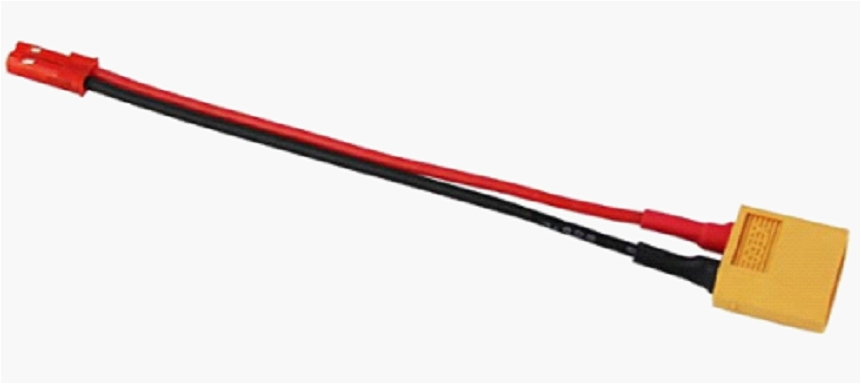
Tutorial: How to Use JST Female to XT60 Male 10 cm
The JST female to XT60 male connector is ideal for connecting devices with high current power supply, such as LiPo batteries or motors, to Arduino or Raspberry Pi systems. This tutorial will guide you through the installation and connection of this connector.
What you need
- connection between power supply and device
- protection against overheating
- safe connection between battery and circuit
Steps
- Check the XT60 connector compatibility with the battery or destination device.
- Check the JST connector compatibility with the source device.
- Trim the wires of the power supply or destination device to the desired length.
- Strip the wires to expose the internal conductors.
- Connect the wires to the XT60 connector according to the wire colors (red for positive, black for negative).
- Use electrical tape to protect the connections.
- Repeat steps 4 and 5 for the JST connector.
- Check the installation with a multimeter or electronic tester.
Mini project
Create a safe power supply system for an Arduino drone or rover using this female JST to XT60 male connector.
Common mistakes
- Connect the wires to the XT60 or JST connector incorrectly.
- Do not protect the connections with electrical tape.
- Use wires that are too short or too long.
- Do not check the installation with a multimeter or electronic tester.
Recommended accessories
- LiPo battery compatible with XT60
- Multimeter
- Electrical tape
- Electronic tool kit
Frequently asked questions
What is the length of the connector?
The length of the connector is 10 cm.
How can I verify the compatibility of the connectors?
Check the datasheet of the XT60 and JST connector.
Reviews
There are no reviews yet.