 EN
 IT Italiano
 ES Español
 FR Français
 DE Deutsch
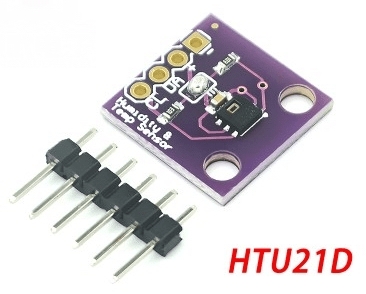
Description
What it is
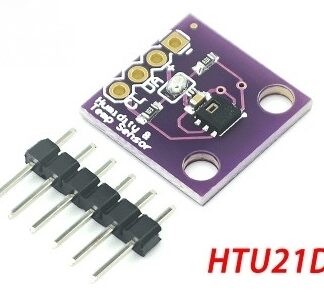
The GY-213V-HTU21D is a digital temperature and humidity sensor module with an I2C interface. It is based on the HTU21D sensor and allows for precise reading of temperature and humidity values.
Features
- Sensor: HTU21D
- Interface: I2C
- Temperature Resolution: check the datasheet
- Humidity Resolution: check the datasheet
- Power Supply: check the datasheet
What it is for
The GY-213V-HTU21D module is ideal for environmental monitoring projects, such as creating humidity sensors for plants, humidity control systems in enclosed environments, or weather monitoring. It is compatible with Arduino and other microcontrollers that support the I2C interface.
Tutorial: How to use GY-213V-HTU21D
The GY-213V-HTU21D is a digital temperature and humidity sensor with an I2C interface, ideal for environmental monitoring projects.
What you need
- Arduino
- Connection cable
- Multimeter (optional)
Steps
- 1. Installation: Download the I2C driver for Arduino.
- 2. Connection: Connect VCC to 5V, GND to GND, SDA to SDA, and SCL to SCL.
- 3. Code: Load the example code.
- 4. Test: Verify readings with a multimeter.
- 5. Configuration: Adjust the I2C frequency if necessary.
- 6. Debug: Check the datasheet if values do not match.
- 7. Final Installation: Integrate into the project.
- 8. Test: Verify functionality.
Example code
```cpp
#include <Wire.h>
#include <HTU21D.h>

HTU21D htu;

void setup() {
  Wire.begin();
  htu.begin();
}

void loop() {
  float t = htu.readTemperature();
  float h = htu.readHumidity();
  Serial.print(t);
  Serial.print(" ");
  Serial.println(h);
}
```
Mini project
Create a humidity monitor for plants in 30 minutes. Connect the GY-213V-HTU21D to a 16×2 display and adjust the voltages to control humidity.
Common mistakes
- Incorrect connection: Check the pins.
- Driver not installed: Download the I2C driver.
- Code not working: Verify the I2C connection.
- Incorrect readings: Check the datasheet.
Recommended accessories
- 16×2 display
- Connection cable
- Arduino
- Multimeter
Frequently asked questions
How can I verify the I2C connection?
Use a multimeter or an oscilloscope to verify the correct voltage on the SDA and SCL pins.
Does the sensor work with 3.3V?
Yes, check the datasheet for details on supported voltages.
What are the temperature and humidity limits?
Check the datasheet for maximum and minimum values.
How can I adjust the I2C frequency?
Configure the frequency in the Arduino code using `Wire.begin(I2C_SPEED);`.
Reviews
There are no reviews yet.