 EN
 IT Italiano
 ES Español
 FR Français
 DE Deutsch
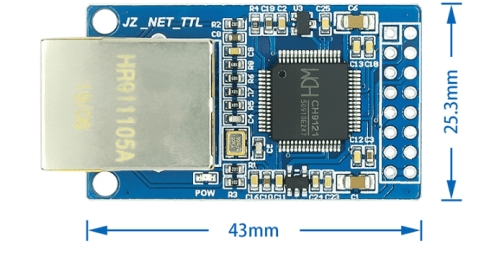
Description
What it is
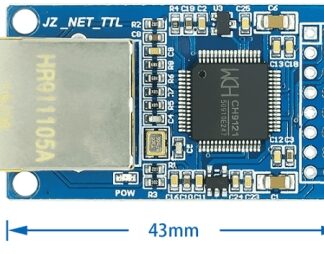
The CH9121 serial to Ethernet module converts serial signals into Ethernet connections. It allows microcontroller-based devices, such as Arduino, to connect to the Internet via an Ethernet connection.
Features
- Serial-Ethernet Conversion
- TCP/IP Protocol
- DHCP Support
- RJ-45 Interface
- Integration with Arduino
What it is for
The CH9121 module is ideal for Internet of Things (IoT) and remote monitoring projects. You can use it to create HTTP servers, manage remote connections, and send data over Ethernet. It is compatible with Arduino and other microcontrollers with a serial interface.
Tutorial: How to Use CH9121
The CH9121 module allows you to connect your Arduino project to the Internet via Ethernet. Ideal for projects that require remote interaction or monitoring.
What you need
- Arduino
- Ethernet cable
- PC for initial setup
Steps
- 1. Connect the CH9121 module to your Arduino using the mass, VCC, and GND pins.
- 2. Connect the Ethernet cable to the CH9121 module.
- 3. Download and install the latest version of Ethernet.h in your Arduino IDE.
- 4. Check the datasheet for the specifications of your Ethernet cable.
- 5. Upload the following example sketch to your Arduino.
- 6. Configure the IP address of the CH9121 module.
- 7. Verify the Ethernet connection with a test sketch.
- 8. Configure your project to use the Ethernet network.
Example code
```
#include <Ethernet.h>

byte mac[] = { 0xDE, 0xAD, 0xBE, 0xEF, 0xFE, 0xED };
EthernetServer server(80);

void setup() {
  Ethernet.begin(mac);
  server.begin();
  Serial.begin(9600);
}

void loop() {
  EthernetClient client = server.available();
  if (client) {
    while (client.connected()) {
      if (client.available()) {
        char c = client.read();
        Serial.print(c);
      }
    }
    client.stop();
    Serial.println();
  }
}
```
Mini project
Create a simple HTTP server that displays the number of received connections.
Common mistakes
- Connecting the Ethernet cable to a non-dedicated ground pin may cause connection issues.
- Always verify the specifications of the Ethernet cable being used.
- If the module does not connect, check the MAC address configuration.
- Ensure that the IP address is correct and there are no conflicts with other devices.
Recommended accessories
- Arduino UNO
- Ethernet cable Cat5e
- 16×2 LCD display
Frequently asked questions
How can I verify the Ethernet connection?
Load the test sketch and verify if the IP address has been assigned correctly.
Can I use this module with Arduino Mega?
Yes, the module is compatible with Arduino Mega.
What are the specifications of the Ethernet cable?
Check the datasheet for the specifications of your Ethernet cable.
Reviews
There are no reviews yet.