 EN
 IT Italiano
 ES Español
 FR Français
 DE Deutsch
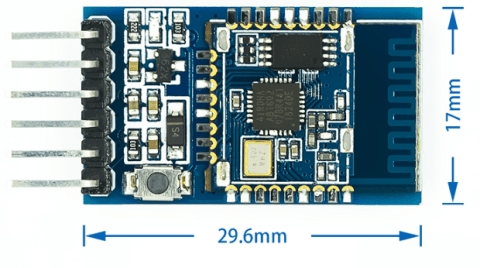
Description
What it is
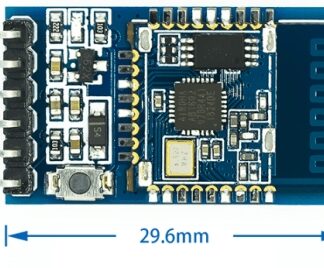
The DIP-6 pin BT16-A BLE4.2 is a low-power consumption (BLE) Bluetooth module in DIP-6 pin format. It allows adding Bluetooth functionality to electronic projects based on microcontrollers.
Features
- Bluetooth Protocol: BLE4.2
- Connectivity: wireless
- Format: DIP-6 pin
- Supply Voltage: check datasheet
- Current Consumption: check datasheet
What it is for
The BT16-A BLE4.2 module is ideal for creating wireless connections in electronic projects. It can be used to control remote devices via smartphones or tablets, transmit data between electronic devices, or implement Bluetooth communication features in IoT projects. Compatibility with Arduino and other microcontrollers is to be verified in the datasheet.
Tutorial: How to use DIP-6 pin BT16-A BLE4.2 Bluetooth
The BT16-A BLE4.2 Bluetooth module is perfect for connecting wireless devices. Ideal for beginner and intermediate makers.
What you need
- Arduino or compatible microcontroller
- Fuses and power supply protector
- Power supply cable
- Socket for mounting
Steps
- 1. Check that the power supply is compatible with the component (5V). Refer to the datasheet.
- 2. Mount the component on the circuit using the DIP-6 socket.
- 3. Connect the power pins (VCC and GND) to the microcontroller.
- 4. Connect the data pins (D0) to the microcontroller.
- 5. Mount the fuse and power supply protector.
- 6. Power up the circuit.
- 7. Upload the Arduino code to the Arduino.
- 8. Test the Bluetooth connection using a smartphone or test software.
Example code
```
#include <BluetoothSerial.h>

BluetoothSerial BTSerial;

void setup() {
  Serial.begin(9600);
  BTSerial.begin(115200);
}

void loop() {
  if (BTSerial.available()) {
    Serial.write(BTSerial.read());
  }
}
```
Mini project
Create a remote control for an LED using a smartphone and the Bluetooth component.
Common mistakes
- Do not verify power supply compatibility before installation.
- Connecting the wrong pins.
- Omitting the installation of the fuse.
- Failing to correctly configure the baud rate in the Arduino code.
Recommended accessories
- Arduino Uno
- DIP-6 Socket Adapter
- 200mA Fuse
- Mounting Adapter
Frequently asked questions
Does the component support multi-platform connections?
Yes, it supports connections with Android and iOS.
What are the communication limitations?
The maximum communication range is approximately 10 meters.
Can it work with Arduino Mega?
Yes, but make sure the power supply is compatible.
How can I test the connection?
Use a Bluetooth app to test the connection.
Reviews
There are no reviews yet.