 EN
 IT Italiano
 ES Español
 FR Français
 DE Deutsch
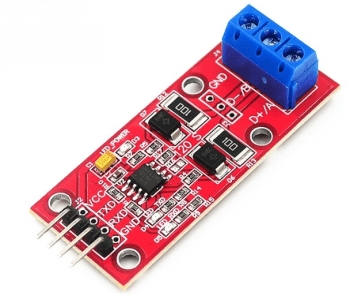
Description
What it is
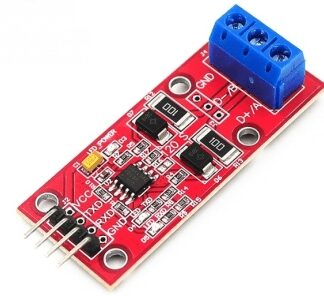
The UART to RS485 Converter V2.0 (SKU: ARD0011759) allows connecting devices that use the UART protocol with devices that use the RS485 protocol.
Features
- Check the datasheet
- Check the datasheet
- Check the datasheet
- Check the datasheet
What it is for
This converter is ideal for Arduino projects and industrial communication systems that require robust connectivity between devices over long distances. Example use: create a temperature monitoring system with a DHT11 sensor, a microcontroller, and an LCD display connected to the RS485 converter.
Tutorial: How to use UART to RS485 Converter V2.0
This converter allows you to transmit data over long distances in a communication network. Ideal for projects that require robust connectivity between devices.
What you need
- UART to RS485 Converter V2.0
- Arduino or compatible microcontroller
- RS485 cable
- Thermocouple
Steps
- 1. Check that the converter has the following connections: TXD, RXD, GND, VCC. Verify in the datasheet.
- 2. Connect the TXD of your microcontroller (e.g., Arduino) to the RXD of the converter.
- 3. Connect the RXD of your microcontroller to the TXD of the converter.
- 4. Connect GND of the microcontroller to GND of the converter.
- 5. Connect VCC of the microcontroller to VCC of the converter (5V). Verify in the datasheet.
- 6. Connect the TXD and RXD pins of the converter to an RS485 cable.
- 7. Use a soldering iron to ensure a solid and stable connection.
- 8. Load an example Arduino sketch to test the communication.
Example code
```cpp
void setup() {
  Serial.begin(9600);
}

void loop() {
  Serial.println("Hello, RS485!");
}
```
Mini project
Create a simple temperature monitoring system using a DHT11 sensor and an LCD display. Connect the sensor to the microcontroller and the display to the RS485 converter.
Common mistakes
- Do not properly check the TXD and RXD pins.
- Do not use a soldering iron for the connections.
- Connect VCC to a power supply different from that of the microcontroller.
- Omit the check on the datasheet.
Recommended accessories
- DHT11 Sensor
- LCD Display
- RS485 Cable
- Thermocouple
Frequently asked questions
Which pins are needed to connect the converter?
Connect TXD, RXD, GND and VCC. Check the datasheet for power supply specifications.
Can I use a power supply different from 5V?
Check the datasheet. Other voltages may damage the converter.
Does the converter support protocols other than UART?
The converter supports only UART. Check the datasheet for further details.
Can I use a microcontroller other than Arduino?
Yes, but make sure the power supply voltage is compatible. Check the datasheet.
Reviews
There are no reviews yet.