 EN
 IT Italiano
 ES Español
 FR Français
 DE Deutsch
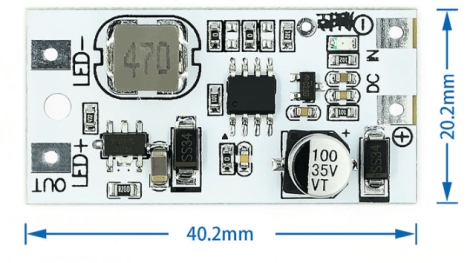
Description
What it is
The Constant Current LED Driver Module with Single Channel Touch Dimmer, identified with SKU ARD0011954, is a device used to control the brightness of a single LED or a group of LEDs. This module allows adjusting the light intensity through a touch switch, providing precise and flexible control.
Features
- Constant Current LED Driver
- Single Channel Touch Dimmer
- Ideally suited for Arduino projects
- Brightness control of a single LED or group of LEDs
What it is for
The module is ideal for home or artistic lighting projects where precise light control is necessary. It can be used in conjunction with Arduino or other microcontrollers to create customized lighting circuits. Check the datasheet for further details on compatibility with specific microcontrollers and for additional technical information.
Tutorial: How to Use Constant Current LED Driver Module with Touch Dimmer
The Constant Current LED Driver Module with Touch Dimmer is perfect for controlling the brightness of a single LED or group of LEDs from an Arduino circuit. It is ideal for home or artistic lighting projects where brightness regulation is crucial.
What you need
- Arduino Uno or compatible
- USB cable to connect the Arduino to the computer
- LED or group of LEDs
- Resistor to limit the current
- Connectors to connect the components
- Arduino IDE software
Steps
- Connect the module to the Arduino circuit following the documentation.
- Check the power supply voltage of the module and the LED.
- Connect the LED to the module, verifying the correct resistor from the datasheet.
- Write and upload the Arduino sketch to control the module.
- Test the LED brightness regulation.
- Verify that the touch dimmer works correctly.
- Adjust the LED brightness using the touch dimmer.
- Test the circuit under electrical load conditions.
Example code
void setup() {
  pinMode(9, OUTPUT);
}

void loop() {
  analogWrite(9, potValue);
}
Mini project
Create a home lighting circuit controlling the brightness of an LED or a group of LEDs using the Constant Current LED Driver Module with Touch Dimmer.
Common mistakes
- Use an LED without a resistor.
- Do not connect the module to the Arduino circuit correctly.
- Do not check the power supply voltage of the module.
- Do not test the touch dimmer.
Recommended accessories
- Variable resistors
- RGB LED
- Light Sensors
- Network Control Modules
Frequently asked questions
The module is not working.
Check all connections and power supply voltage.
How to adjust the LED brightness?
Use the touch dimmer to adjust the brightness.
Can I use more LEDs?
Check the maximum power supported in the datasheet.

Reviews
There are no reviews yet.