 EN
 IT Italiano
 ES Español
 FR Français
 DE Deutsch
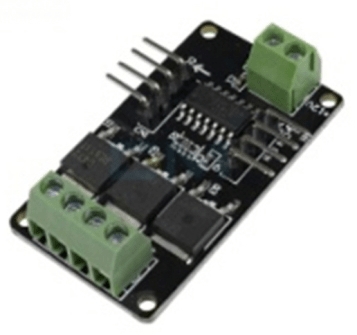
Description
What it is
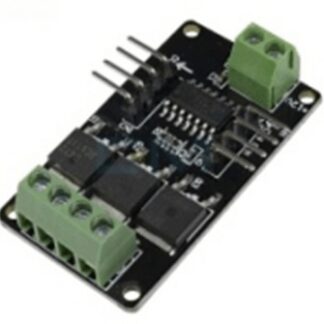
The STM32 AVR V1.0 RGB LED Strip Driver Module is an electronic component designed to control RGB LED strips. It allows for the management of LED on/off, brightness, and setting different colors through a microcontroller.
Features
- RGB LED Strip Control
- STM32 AVR Microcontroller
- Check the datasheet: supply voltage
- Check the datasheet: output current
- Check the datasheet: number of channels
- Check the datasheet: communication protocols
What it is for
This module is ideal for custom lighting projects, artistic installations, and visualization applications. It can be used to create ambient lamps with custom lighting effects, artistic light installations, and screens. The module is compatible with Arduino microcontrollers and other STM32-based devices.
Tutorial: How to Use the LED Strip RGB Driver Module STM32 AVR V1.0
The LED Strip RGB Driver Module STM32 AVR V1.0 is designed to control high-quality RGB LED strips. It is ideal for custom lighting projects, artistic installations, and visualization applications.
What you need
- Arduino or compatible microcontroller
- RGB LED Strip
- Connection cable
- LED power supply
Steps
- Connect the module to the microcontroller via the appropriate connector
- Connect the LED strip to the module via the specific connectors
- Check the proper power supply for the module and the LED strip
- Download the example code onto the microcontroller
- Modify the code to customize the lighting functions
- Test the operation of the LED strip
- Add a user interface to control the functions
- Implement a remote or network control system
Example code
void setup() {
  // Inizializza la comunicazione con il modulo LED
  // Verifica sul datasheet
}

void loop() {
  // Controlla i LED RGB
  // Verifica sul datasheet
}
Mini project
Create an ambient light with customized lighting effects. Connect the LED strip to the module and the microcontroller, write code to manage the light cycle (daylight, night, etc.) and add a button to turn the lamp on and off.
Common mistakes
- Insufficient power supply error
- Incorrect connection between the module and the LED strip
- Incorrect microcontroller configuration
- Code not optimized for module control
Recommended accessories
- RGB LED Strip
- Arduino Uno
- USB cable
- 5V power supply
Frequently asked questions
What is the power supply voltage of the module?
Check the datasheet.
How can I control the module from an app?
Add a network communication library to your code and connect the app to the microcontroller via Wi-Fi.
Can I connect multiple LED strips to the module?
Check the module specifications for multi-strip configuration.
Reviews
There are no reviews yet.