 EN
 IT Italiano
 ES Español
 FR Français
 DE Deutsch
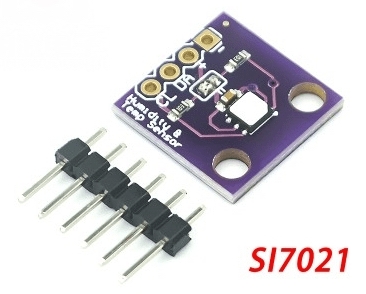
Description
What it is
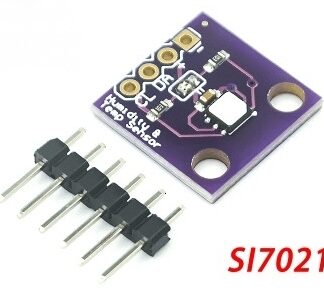
The SI7021 is a high-precision I2C temperature and humidity sensor module. It is designed to provide accurate measurements of temperature and humidity in various types of applications.
Features
- I2C Temperature and Humidity Sensor Module
- High Precision
- I2C Communication
What it is for
SI7021 modules are ideal for environmental monitoring projects, storage condition controls, and home automation applications. You can use it to design a climate monitoring system that sends temperature and humidity data to a cloud platform like ThingSpeak. It is compatible with Arduino and ESP.
Tutorial: How to Use SI7021 Temperature and Humidity Sensor Module
The SI7021 module is a high-precision digital I2C sensor for measuring temperature and humidity. It is ideal for environmental monitoring projects, storage condition controls, and home automation applications.
What you need
- Arduino or compatible I2C microcontroller
- USB cable
- I2C connections
- Arduino development software
Steps
- Connect the SI7021 module to the microcontroller’s I2C pins (VCC to 3.3V or 5V, GND to ground, SDA to pin A4, SCL to pin A5).
- Install the Adafruit_Sensor and Adafruit_SI1145 libraries in the Arduino IDE.
- Upload the example sketch provided by the library to the microcontroller.
- Open the Serial Monitor at 9600 baud.
- Verify correct sensor communication by displaying temperature and humidity values.
- If necessary, adjust measurement parameters in the code.
- Design an application that uses sensor data, such as an extreme condition alarm system.
- Test the project in various environmental conditions.
Example code
void setup() {
  Serial.begin(9600);
  // Inizializza il sensore
}

void loop() {
  // Leggi la temperatura e l'umidità
  Serial.print("Temperatura: ");
  Serial.println(temperatura);
  Serial.print("Umidità: ");
  Serial.println(umidità);
  delay(1000);
}
Mini project
Design a weather monitoring system that sends temperature and humidity data to a cloud platform like ThingSpeak.
Common mistakes
- I2C connection error
- Incorrect configuration parameters
- Libraries not installed correctly
- Physical obstruction to the sensor
Recommended accessories
- Arduino Uno
- USB cable
- 3D print to protect the sensor
- OLED display to show the data
Frequently asked questions
How can I verify communication with the sensor?
Use the Serial Monitor to view temperature and humidity data.
The sensor is not communicating with Arduino, what should I do?
Check the connections and ensure the library is installed correctly.
What are the operating temperatures of the sensor?
Check the product datasheet.
Reviews
There are no reviews yet.