 EN
 IT Italiano
 ES Español
 FR Français
 DE Deutsch
Description
What it is
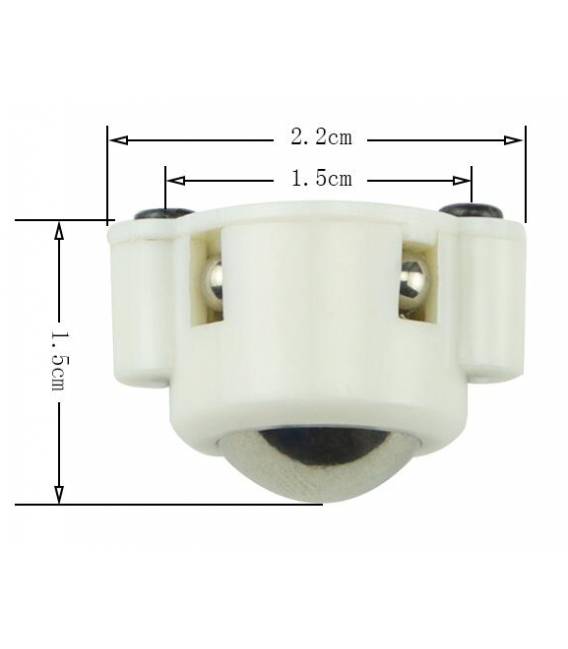
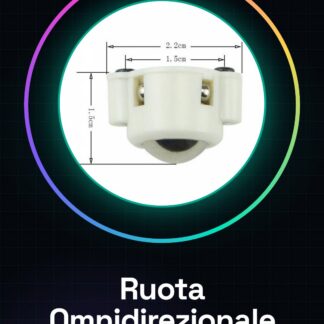
The MiniQ 3PI Omni-directional Wheel with N20 Motor is a component designed for building robot cars, rovers, and drones. It allows the robot to move in any direction without needing to turn.
Features
- Name: MiniQ 3PI Omni-directional Wheel
- Motor: N20
- SKU: ARD009976
- Price: 2.71 €
- Categories: Robot / Smart Car / Rover, Aerial Robot Car
What it is for
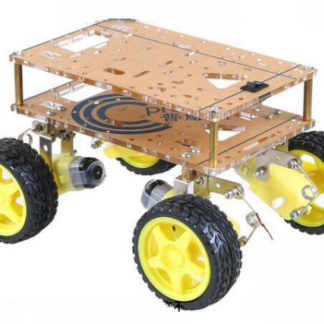
The MiniQ 3PI Omni-directional Wheel is ideal for building a versatile and agile robot car. It can be used for smart car projects that follow a black line on the floor, or for rovers that explore complex environments. Its omnidirectional structure allows the robot to move in any direction without needing to turn.
Tutorial: How to Use MiniQ 3PI Omni-directional Wheel for Smart Car
The MiniQ 3PI Omni-directional Wheel is ideal for building a versatile and agile robot car. This component is particularly suitable for smart car, rover, and drone projects.
What you need
- Arduino Uno
- Motors N20
- Motors driver L298N
- Connecting wire
- Mounting base
Steps
- Check the compatibility of the MiniQ 3PI wheel with your smart car project.
- Mount the MiniQ 3PI wheel on the robot base using the provided screws or an alternative fixing system.
- Connect the motor N20 to the MiniQ 3PI wheel following the instructions in the motor datasheet.
- Connect the motor N20 wires to the L298N driver to manage the direction and speed of the wheel.
- Connect the L298N driver to the Arduino Uno, assigning the correct pins as indicated in the driver datasheet.
- Write the Arduino sketch that controls the motor N20 through the L298N driver.
- Test the MiniQ 3PI wheel to ensure it moves correctly in all directions.
- Optimize the motor control and direction parameters according to the specific needs of your project.
Example code
// Esempio di sketch Arduino per controllare un motore N20 con L298N
// Verifica sul datasheet per i pin corretti.
void setup() {
pinMode(DIREZIONE1, OUTPUT);
pinMode(DIREZIONE2, OUTPUT);
}
void loop() {
digitalWrite(DIREZIONE1, HIGH);
digitalWrite(DIREZIONE2, LOW);
analogWrite(PULSANTI, 255); // Setta la velocità
}
Mini project
Create a smart car that follows a black line on the floor. Use the MiniQ 3PI wheel to allow the robot to move in any direction without having to turn.
Common mistakes
- Do not verify the wheel’s compatibility with the motor.
- Incorrect pin connection between Arduino and L298N driver.
- Missing optimization of motor speed to achieve smooth movement.
- Physical mounting issues that limit the rotation of the wheel.
Recommended accessories
- Motors driver L298N
- Motors N20
- Arduino Uno R3
- IR sensors for line following
Frequently asked questions
Can this wheel be used with other types of motors?
Yes, but verify the motor’s compatibility and power requirements before installation.
How can I control multiple wheels from a single Arduino?
Use the L298N driver to manage multiple motors with a single Arduino.
What is the difference between this wheel and a standard wheel?
The MiniQ 3PI wheel allows the robot to move in any direction without having to turn, making the movement much more agile.

Reviews
There are no reviews yet.