 EN
 IT Italiano
 ES Español
 FR Français
 DE Deutsch
Description
What it is
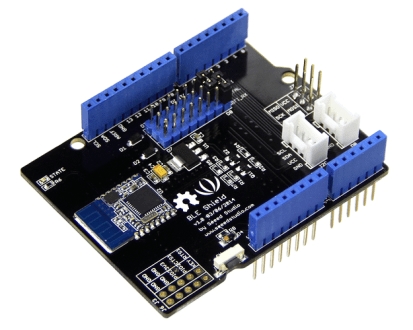
The Bluetooth BLE Shield is an expansion module for Arduino that adds Bluetooth Low Energy (BLE) functionality to your project. It allows wireless communication with other Bluetooth devices such as smartphones, tablets, or computers.
Features
- Bluetooth Low Energy (BLE) Connection
- Compatible with Arduino
- SKU: ARD0011756
- Price: 45 €
What it is for
The Bluetooth BLE Shield is ideal for projects requiring wireless communication between Arduino and Bluetooth devices. Some examples of usage include:
- Remote monitoring systems
- Bluetooth user interfaces
- Wireless data transfer
Compatibility with Arduino allows for easy integration into projects based on this platform.
Tutorial: How to use Bluetooth BLE Shield
The Bluetooth BLE Shield allows you to connect your Arduino project to Bluetooth devices, facilitating cable-free data transfer. Useful for projects requiring Bluetooth connectivity, such as monitoring systems or user interfaces.
What you need
- Arduino UNO or compatible
- USB cable for power supply
- Bluetooth BLE Shield board
- Bluetooth antenna (optional)
- Computer for code upload
- Bluetooth BLE library for Arduino
Steps
- 1. Installation: Download and install the Bluetooth BLE library for Arduino.
- 2. Connection: Connect the Bluetooth BLE Shield board to your Arduino UNO.
- 3. Antenna: If necessary, mount the Bluetooth antenna on the back of the board.
- 4. Configuration: Configure the Bluetooth settings in the Arduino code.
- 5. Upload: Upload the code to the Arduino.
- 6. Test: Activate the Bluetooth connection on your smartphone and try to send data.
- 7. Debug: Check the datasheet for any additional specifications you may need.
- 8. Customization: Adapt the code to your specific needs.
Example code
```void setup() { BLEDevice::init("MyDevice"); BLEServer *pServer = BLEDevice::createServer(); BLEService *pService = pServer->createService(BLEUUID("6E400001-B5A3-F393-E0A9-E50E24DCCA9E")); BLECharacteristic *pCharacteristic = pService->createCharacteristic( BLEUUID("6E400002-B5A3-F393-E0A9-E50E24DCCA9E"), BLECharacteristic::PROPERTY_READ | BLECharacteristic::PROPERTY_WRITE); pCharacteristic->setValue("Hello, World!"); pService->start(); BLEAdvertising *pAdvertising = BLEDevice::getAdvertising(); pAdvertising->addServiceUUID(pService->getUUID()); pAdvertising->start();}void loop() {}```Mini project
Create a simple step counter using a PIR sensor and send the data to your smartphone via Bluetooth BLE.
Common mistakes
- Omit the Bluetooth BLE library.
- Fail to properly connect the board.
- Misconfigure the Bluetooth settings.
- Fail to test the Bluetooth connection.
Recommended accessories
- PIR detectors
- Smartphone or tablet with Bluetooth
- Lead to connect the PIR detector
- Bluetooth antenna (if needed)
Frequently asked questions
How can I verify the Bluetooth connection?
Use an app like nRF Connect to check the connection.
What are the minimum requirements for the Arduino?
You need an Arduino UNO or a compatible board with the Bluetooth BLE library installed.
Can I use this board with other microcontrollers?
Check the datasheet for compatibility with other microcontrollers.

Reviews
There are no reviews yet.