 EN
 IT Italiano
 ES Español
 FR Français
 DE Deutsch
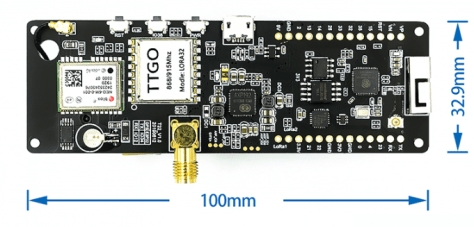
Description
What it is
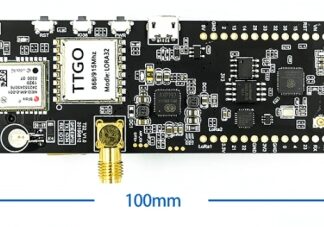
The Bluetooth 932MHz TTGO T-Beam ESP32 WiFi/GPS module is an integrated device that combines multiple functionalities into a single module, ideal for Internet of Things (IoT) projects and remote monitoring applications.
Features
- ESP32 Module
- WiFi Connectivity
- Bluetooth Connectivity
- NEO GPS System
- Operating Frequency: 932MHz
- Integrated LORA 32
What it is for
This module is designed for use in IoT projects, remote monitoring, and drone applications. It can send real-time temperature and humidity data to a web platform. It is compatible with Arduino and can be used to develop applications requiring WiFi, Bluetooth, and GPS connectivity.
Tutorial: How to Use TTGO T-Beam ESP32 Bluetooth Module
The TTGO T-Beam ESP32 module combines WiFi, Bluetooth, and GPS functionalities into a single device, ideal for IoT projects and remote monitoring.
What you need
- Arduino IDE
- Computer with Windows, macOS, or Linux operating system
- USB Type A to micro USB cable
- ESP32 configuration software
Steps
- Install the Arduino IDE and the necessary driver for your computer.
- Download and install the ESP32 library for Arduino.
- Connect the TTGO T-Beam module to your computer via the micro USB cable.
- Open a new sketch in Arduino IDE and write the example code for WiFi connection.
- Upload the code to the TTGO T-Beam module.
- Verify the WiFi connection and the stability of the module through the Arduino IDE serial monitor.
- Configure the Bluetooth function if necessary, following the official documentation.
- Try to connect to the module via a Bluetooth device to test the data transmission function.
Example code
void setup() {
  Serial.begin(115200);
  WiFi.begin("SSID", "PASSWORD");
  while (WiFi.status() != WL_CONNECTED) {
    delay(500);
    Serial.print(".");
  }
  Serial.println("nWiFi connected");
}
Mini project
Create a time monitoring system that sends real-time temperature and humidity data to a web platform using the TTGO T-Beam ESP32 module.
Common mistakes
- WiFi connection issues due to incorrect SSID or password configuration.
- Difficulty installing the ESP32 library.
- Module not recognized by the computer.
- Bluetooth connection error due to incorrect destination device configuration.
Recommended accessories
- Temperature and humidity sensors DHT11
- External antenna to improve WiFi reception
- Bluetooth device for testing data transmission
- Backup battery to power the module in case of power outage
Frequently asked questions
How can I configure the GPS module?
Check the datasheet for the specific configuration of the integrated GPS NEO6M module.
What is the difference between WiFi and Bluetooth?
WiFi is used to connect to the Internet, while Bluetooth is used for short-range communication between devices.
Can the module function without external power supply?
Check the datasheet for the module’s power supply specifications.
Reviews
There are no reviews yet.