 EN
EN IT Italiano
 ES Español
 FR Français
 DE Deutsch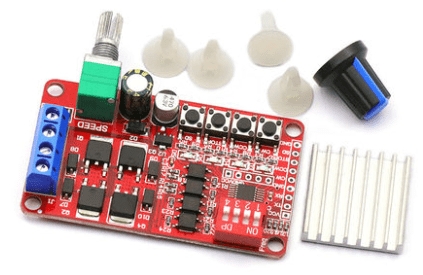
Description
What it is
The ARD0011957 controller is a command board for bidirectional control of DC motors, allowing management of both the motor’s direction and speed. This device is designed for use in electronics and robotics projects, providing a simple solution for automation and prototypes.
Features
- Bidirectional motor control
- Motors speed control
- Compatible with Arduino and ESP
What it is for
This controller is ideal for automation, robotics, and prototype projects that require the control of DC motors. You can use it to build a robot prototype that moves forward and backward, connecting the controller to the motor and a potentiometer for manual control of speed and direction.
Tutorial: How to Use Motor Speed Controller
This motor speed controller allows you to control the direction and speed of the motor. Ideal for automation, robotics, and prototype projects.
What you need
- Arduino Uno
- Continuous Current Motors
- Connection Cables
- Potentiometer (optional for manual control)
- Power Supply
Steps
- Connect the continuous current motor to the controller’s output pins.
- Connect the controller to pin 9 of the Arduino for speed control.
- Connect the potentiometer to pin A0 of the Arduino for manual control (optional).
- Upload the Arduino sketch to the microcontroller.
- Check the motor’s power supply voltage (check the datasheet).
- Start the motor forward and backward with the software command.
- Adjust the motor speed through the software.
- Monitor the motor output with an oscilloscope (optional).
Example code
void setup() {
  pinMode(9, OUTPUT);
}

void loop() {
  analogWrite(9, 128); // Imposta la velocità del motore
}
Mini project
Build a basic robot prototype that moves forward and backward. Connect the controller to the motor and the potentiometer for manual control.
Common mistakes
- Connect the motor with reversed polarity.
- Do not check the motor supply voltage.
- Use an inappropriate PWM value.
- Do not monitor the motor output for any operational issues.
Recommended accessories
- Arduino Uno
- DC Motors
- Connection Cables
- Potentiometer
Frequently asked questions
How to adjust the motor speed?
Use the analogWrite command to adjust the motor speed.
How to reverse the motor direction?
Change the sign of the PWM value or reverse the motor polarity.

Reviews
There are no reviews yet.