 EN
 IT Italiano
 ES Español
 FR Français
 DE Deutsch
Description
What it is
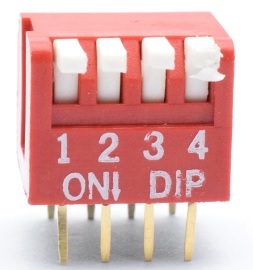
The 4-way toggle switch 2.54mm is an electronic component that allows you to select among four different options. It can be used to control multi-directional devices in Arduino or similar projects.
Features
- 4-way
- 2.54mm pitch
- 2 pieces per pack
What it is for
The 4-way toggle switch is ideal for controlling multi-directional devices in Arduino projects. It can be used for example to:
- Select different settings of a device
- Control the flow of current to different sections of a circuit
For Arduino compatibility, check the datasheet.
Tutorial: How to use 4-way Toggle Switch 2.54mm
The 4-way toggle switch 2.54mm is a fundamental component for electronic projects that require selection between multiple options. Perfect for beginners and intermediate makers, it allows for simple and reliable management of electrical flow.
What you need
- Arduino
- Connection wire
- Test pin
Steps
- Install the switch on a breadboard.
- Connect the switch pins to the Arduino digital pins using connection wires.
- Write and upload the Arduino sketch to test the switch.
- Verify that the switch works correctly by changing the lever positions.
- If necessary, adjust the connections to ensure a stable connection.
Example code
void setup() {
  pinMode(2, INPUT);
  pinMode(3, INPUT);
  pinMode(4, INPUT);
  pinMode(5, INPUT);
}

void loop() {
  int val = digitalRead(2);
  if (val == HIGH) {
    Serial.println("Posizione 1");
  }
  val = digitalRead(3);
  if (val == HIGH) {
    Serial.println("Posizione 2");
  }
  val = digitalRead(4);
  if (val == HIGH) {
    Serial.println("Posizione 3");
  }
  val = digitalRead(5);
  if (val == HIGH) {
    Serial.println("Posizione 4");
  }
}
Mini project
Create a small prototype that changes the LED brightness based on the switch position. Use the Arduino digital pins to control the LED PWM output value.
Common mistakes
- Unstable or intermittent connections.
- Default switch positions incorrect.
- Pins not configured correctly in Arduino.
- Error reading the logical value of the switch.
Recommended accessories
- Breadboard
- Arduino Uno
- Connecting cables
- LED
Frequently asked questions
Which pins should I use?
Use the digital pins on the Arduino to connect the switch.
How can I test the switch?
Load the test sketch and check the Serial console to see the switch positions.
Can I use this switch with other microcontrollers?
Yes, but make sure the input/output pins are compatible.



Reviews
There are no reviews yet.