 EN
 IT Italiano
 ES Español
 FR Français
 DE Deutsch
Description
What it is
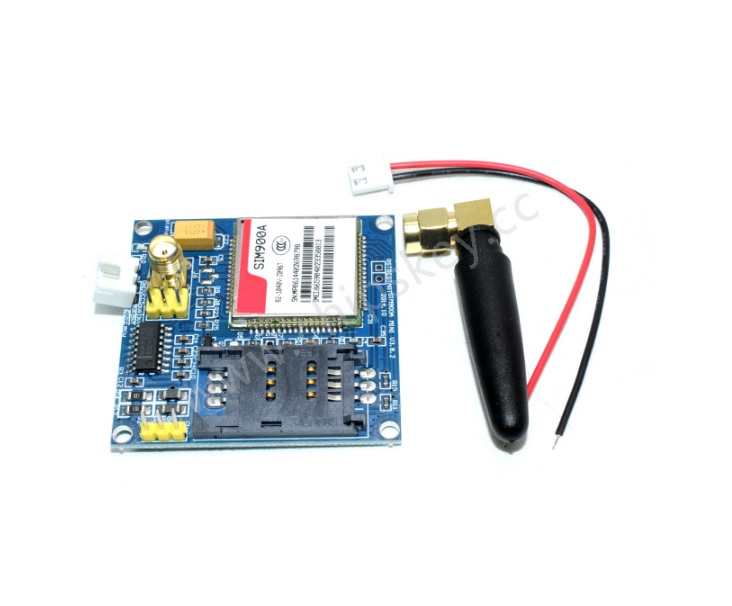
The SIM900A module is an electronic component that allows your Arduino projects to connect to the internet via a cellular connection.
Features
- Cellular GSM/GPRS Connection
- SIM card support
- Sending and receiving SMS
- Making calls
What it is for
The SIM900A module is ideal for remote monitoring projects, Internet of Things (IoT) applications, and applications that require long-distance communication. Examples of use include:
- Creating an alarm system that sends SMS in case of power failure.
- Developing remote monitoring devices for temperature, humidity, or other parameters.
- Building remote control systems for appliances or other devices.
Tutorial: How to use SIM900A
The SIM900A module is an ideal component for those who want to add cellular communication functionality to Arduino projects. It works with SIM cards and allows sending/receiving SMS and making calls.
What you need
- Arduino Uno
- SIM card
- FTDI cable
- GSM antenna
- 10kΩ resistor
Steps
- 1. Installation: Download and install the latest version of SoftwareSerial for Arduino.
- 2. Connection: Connect SIM900A to Arduino using the following pins: TX Arduino to RX SIM900A, RX Arduino to TX SIM900A, GND Arduino to GND SIM900A, VCC Arduino to 3.3V SIM900A.
- 3. Antenna: Connect the GSM antenna to the SIM900A antenna port.
- 4. Resistor: Connect a 10kΩ resistor between VCC SIM900A and GND SIM900A.
- 5. Boot: Power on Arduino and verify the boot of the SIM900A module.
- 6. Sketch: Load the following sketch to test the connection.
- 7. SMS: Write a simple sketch to send an SMS.
- 8. Debug: Use Serial Monitor to debug errors.
Example code
```
#include <SoftwareSerial.h>

SoftwareSerial gsmSerial(10, 11); // RX, TX

void setup() {
  Serial.begin(9600);
  gsmSerial.begin(9600);
}

void loop() {
  if (gsmSerial.available()) {
    Serial.write(gsmSerial.read());
  }
  if (Serial.available()) {
    gsmSerial.write(Serial.read());
  }
}
```
Mini project
Create an alarm device that sends an SMS in case of power outage.
Common mistakes
- Check the datasheet: ensure the correct power supply (3.3V) is used.
- Check the datasheet: make sure to use the correct 10kΩ resistor.
- Check the datasheet: make sure to use the correct SIM card frequency.
- Check the datasheet: make sure to use the correct SIM card frequency.
Recommended accessories
- FTDI cable
- GSM antenna
- SIM card
- 10kΩ resistor
Frequently asked questions
How can I test the connection?
Load the provided sketch and check the Serial Monitor.
What are the minimum power requirements?
The module requires 3.3V and consumes approximately 200mA.
Can I use a 4G SIM card?
Check the datasheet: it may not be compatible with 4G.



Reviews
There are no reviews yet.