 EN
 IT Italiano
 ES Español
 FR Français
 DE Deutsch
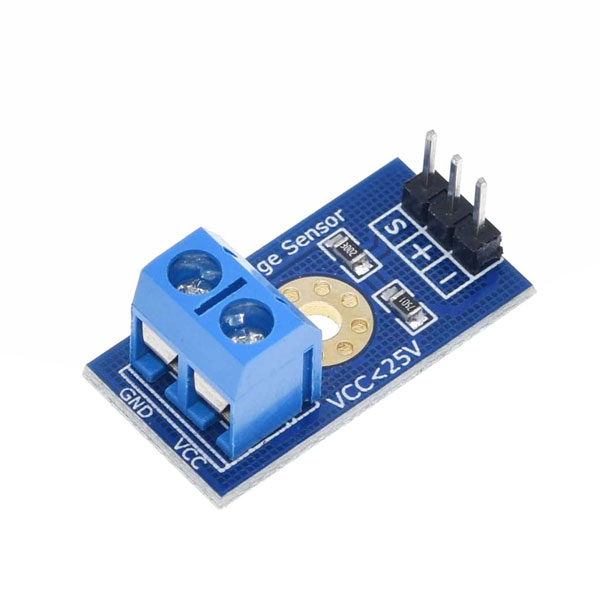
Description
What it is
The voltage detection sensor from 0 to 25V is an electronic device designed to measure voltage levels within a precise range. This sensor is particularly useful for monitoring voltage in various electronic devices, providing accurate and precise data.
Features
- Measurement range: 0 to 25V
- Ideally suited for robotics and Arduino projects
- Connectable to an Arduino analog pin
What it is for
This sensor is used to build a voltage monitoring system in robotics and Arduino projects. You can connect it to an analog pin and use an OLED display to show the voltage values in real-time. It is compatible with Arduino and can be integrated into various electronic devices to monitor and control voltage levels.
Tutorial: How to use Voltage Detection Sensor 0-25V
The 0 to 25V voltage detector sensor is ideal for monitoring voltage levels in various electronic devices. It is particularly useful for robotics and Arduino projects where accurate voltage level control is necessary.
What you need
- Arduino Uno
- USB Cable
- 0-25V Voltage Detector Sensor
- Battery or Power Supply
Steps
- Connect the voltage detector sensor to the Arduino’s analog pin A0.
- Connect the voltage detector sensor to the Arduino’s GND pin.
- Connect the voltage detector sensor to the Arduino’s VCC pin.
- Upload the example sketch to the Arduino.
- Open the Serial Monitor to view the voltage values.
- Verify the correct reading of the voltage values.
- Adjust the input voltage and observe the changes on the Serial Monitor.
- Check the accuracy of the sensor by comparing it with a multimeter.
Example code
void setup() {
  Serial.begin(9600);
}

void loop() {
  int sensorValue = analogRead(A0);
  float voltage = sensorValue * (5.0 / 1023.0);
  Serial.println(voltage);
  delay(1000);
}
Mini project
Build a voltage monitoring system for an Arduino robot. Connect the sensor to an analog pin and use an OLED display to show the voltage values in real-time.
Common mistakes
- Do not connect the sensor correctly to the Arduino pins.
- Do not verify the correct reading of the voltage values.
- Do not adjust the input voltage to test variations.
- Do not compare the sensor values with a multimeter to check accuracy.
Recommended accessories
- OLED Display
- 9V Battery
- USB Power Supply
- Multimeter
Frequently asked questions
What is the precision of the sensor?
Check the datasheet.
Can it be used with other microcontrollers besides Arduino?
Yes, but verify pin and power compatibility.
How do you connect the sensor to an OLED display?
Connect the sensor pins to those of the OLED and use an I2C communication software.
Reviews
There are no reviews yet.