 EN
 IT Italiano
 ES Español
 FR Français
 DE Deutsch
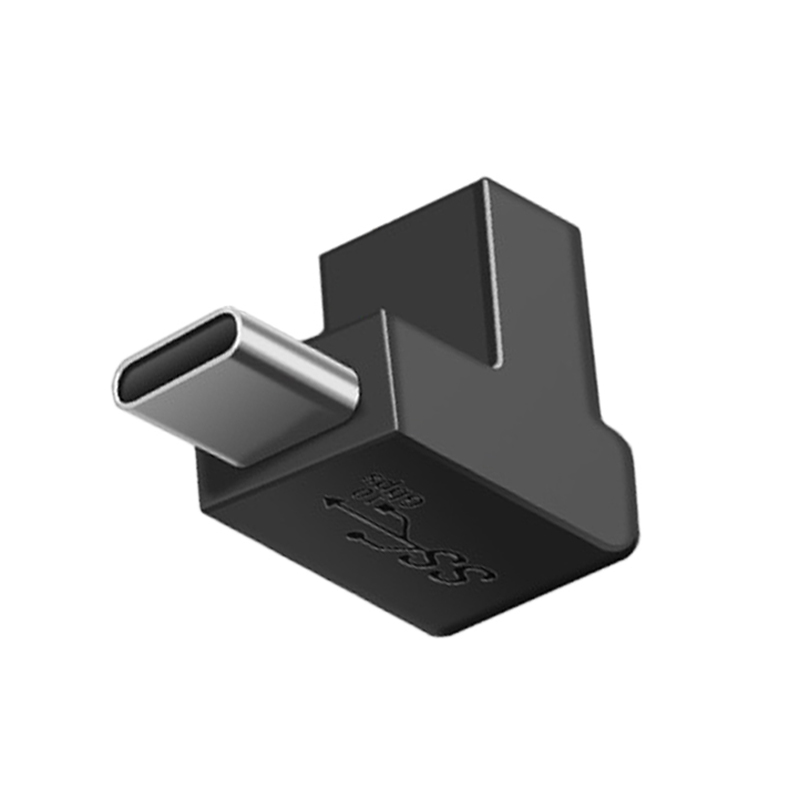
Description
Tutorial: How to Use USB Type C to Type L Cable
The USB Type C to Type L (vertical bend) cable connector is useful for connecting devices that use USB Type C to those that use USB Type L (micro USB). This is particularly useful for makers and Arduino programmers who work with various types of USB connectors.
What you need
- Arduino
- device with USB Type C connector
- device with USB Type L connector
Steps
- Check that the cable is compatible with your devices.
- Connect the USB Type C end to the device that supports it.
- Connect the USB Type L end to the device that supports it.
- Verify that the devices are recognized correctly.
- If necessary, check for proper data transmission or power supply.
- If necessary, check for proper data transmission or power supply.
- Verify that the cable is physically stable and does not disconnect during use.
- Check that the lead does not overheat during use.
Mini project
Connect an Arduino to a computer via this USB Type C to Type L cable and send data to and from the Arduino.
Common mistakes
- The cable is not compatible with the devices.
- The cable easily disconnects during use.
- The cable overheats during use.
- The cable does not transmit data or power correctly.
Recommended accessories
- USB Type C to Type C cable
- USB Type L to Type L cable
- USB Type C to Type L adapter
- USB Type C to micro USB cable
Frequently asked questions
Is the cable compatible with all devices?
Check the datasheet for specific compatibility.
Can the cable be used for data transmission?
Check the datasheet for data transmission compatibility.
Can the cable be used for power?
Check the datasheet for power compatibility.

Reviews
There are no reviews yet.