 EN
 IT Italiano
 ES Español
 FR Français
 DE Deutsch
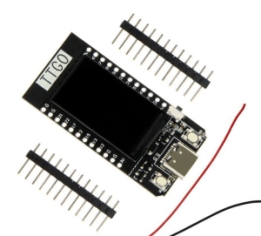
Description
What it is
The TTGO T-Display ESP32 WiFi & Bluetooth development board is a module that integrates an ESP32 microcontroller with support for WiFi and Bluetooth, featuring an integrated display. This module is ideal for projects requiring wireless connectivity and graphical display.
Features
- ESP32 microcontroller
- WiFi support
- Bluetooth support
- Integrated display
- Compatible with Arduino
What it is for
The TTGO T-Display ESP32 WiFi & Bluetooth module is used to create smart and interactive devices that require wireless connectivity and graphical display. It is suitable for projects such as digital clocks, environmental monitoring devices, and other projects that need a display interface with WiFi/Bluetooth connectivity. It is compatible with the Arduino development environment.
Tutorial: How to use TTGO T-Display ESP32 WiFi & Bluetooth Module
The TTGO T-Display ESP32 WiFi & Bluetooth module is an excellent choice for makers who want to create projects with an integrated display, supporting both WiFi and Bluetooth. Ideal for beginners and intermediates who want to explore microcontroller programming.
What you need
- Arduino IDE installed
- USB Type-A to Micro USB cable
- Computer with Windows, macOS, or Linux operating system
- Required libraries (check the datasheet)
- Configuration software (check the datasheet)
Steps
- Install the ESP32 module driver on the computer
- Download and install the Arduino IDE
- Open the Arduino IDE and select the TTGO T-Display ESP32 module
- Load the basic firmware onto the module
- Connect the module to the computer via USB cable
- Verify WiFi and Bluetooth connectivity
- Experiment with provided code examples
- Configure the integrated display (check the datasheet)
Example code
void setup() {
  Serial.begin(115200);
  // Inizializza WiFi e Bluetooth (verifica sul datasheet)
}

void loop() {
  // Aggiungi il tuo codice qui
}
Mini project
Create a touch interface digital clock, displaying the time and date on the integrated display of the TTGO T-Display ESP32 WiFi E Bluetooth module
Common mistakes
- WiFi or Bluetooth connectivity issues
- Display does not turn on or does not respond
- Firmware configuration error
- Problems installing the required libraries
Recommended accessories
- USB Type-A to Micro USB cable
- 3.7V 500mAh LiPo battery
- Breadboard prototype
- Temperature and humidity sensors
Frequently asked questions
Which libraries are needed?
Check the module datasheet for the required libraries.
How can I load the firmware?
Use the Arduino IDE and select the correct module.
The display does not turn on, what should I do?
Check the connectivity and verify the display configuration in the datasheet.
Reviews
There are no reviews yet.