 EN
 IT Italiano
 ES Español
 FR Français
 DE Deutsch
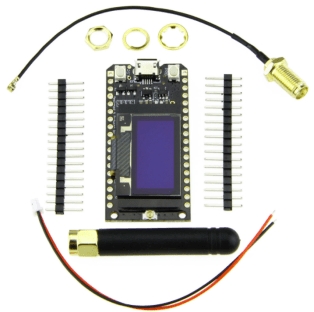
Description
What it is
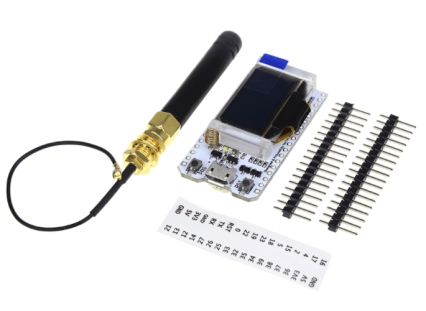
The ESP32 LORA32 915MHz Board is an electronic module that combines an ESP32 processor with a LoRa module for long-range communication, a 0.96-inch OLED display, and Bluetooth and WiFi connections.
Features
- Processor: ESP32
- LoRa Frequency: 915 MHz
- Display: OLED 0.96 inches
- Connections: Bluetooth, WiFi
What it is for
The board is ideal for long-range communication and remote monitoring projects. You can use it to create device monitoring systems, send sensor data to a remote hub, or develop IoT applications. Compatibility with Arduino and ESP-IDF allows for easy integration into projects of varying complexity.
Tutorial: How to Use ESP32 LORA32 915MHz Board
This board is ideal for long-range communication and remote monitoring projects. Useful for beginners and intermediates.
What you need
- Arduino IDE
- USB Cable
- LoRa Antenna
- 3D Printer (optional)
Steps
- 1. Download and install Arduino IDE.
- 2. Connect the board to your PC via USB cable.
- 3. Check the datasheet for Bluetooth/WiFi specifications.
- 4. Load the example code to test the connection.
- 5. Connect the LORA antenna to test 915MHz communication.
- 6. Verify the function of the OLED display.
- 7. Configure WiFi settings in Arduino IDE.
- 8. Try to connect the board to a remote device.
Example code
```
#include <ESP32_LoRa.h>

void setup() {
  Serial.begin(115200);
  LoRa.setPins(5, 18, 19);
  if (!LoRa.begin(915E6)) {
    Serial.println("Could not start LoRa radio");
    while (1);
  }
  Serial.println("LoRa ready");
}

void loop() {
  Serial.println("Sending message");
  LoRa.send("Hello World");
  delay(2000);
}
```
Mini project
Create a remote monitoring system for a device. Connect the board to a temperature sensor and send data to a remote hub.
Common mistakes
- Forget to connect the LORA antenna.
- Set the correct frequencies for LORA communication.
- Fail to configure WiFi settings correctly.
- Forget to verify the function of the OLED display.
Recommended accessories
- Temperature sensor
- LORA antenna
- 0.96″ OLED display
- Arduino UNO
Frequently asked questions
How to configure WiFi settings?
In the module setup, use `WiFi.begin(ssid, password);`.
Why is the OLED display not working?
Check the cable connection and specifications on the datasheet.
What frequencies are supported by LORA?
Check the datasheet, but commonly it supports 915MHz.
Can I use this card with an Arduino UNO?
Yes, but it may require an adapter cable for the pins.
Reviews
There are no reviews yet.