 EN
 IT Italiano
 ES Español
 FR Français
 DE Deutsch
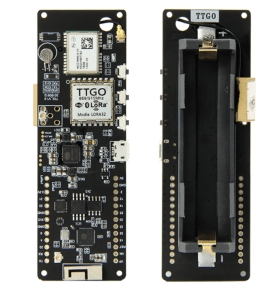
Description
What is the TTGO T-Beam v2? The TTGO T-Beam v2 is a multifunction module for Arduino that integrates WiFi, Bluetooth, and LORA communication features along with an NEO-M8N GPS module. This module is designed to facilitate IoT projects and remote monitoring systems. Features: – Bluetooth Wireless ESP32 Module – WiFi Connectivity – LORA Module – NEO-M8N GPS Module – 868MHz Frequency What does the TTGO T-Beam v2 do? The TTGO T-Beam v2 is ideal for IoT projects requiring wireless connections, GPS tracking, and LORA communication. It can be used to create remote monitoring devices that send real-time positions. Compatible with Arduino and ESP32. Tutorial: How to Use TTGO T-Beam – A Bluetooth Wireless ESP32 module with LORA and GPS, perfect for IoT and remote monitoring projects. What you need: – Arduino IDE – USB cable – 10kΩ Resistor (for GPS) – Battery (optional) Steps: 1. Download and install Arduino IDE. 2. Connect T-Beam to computer via USB cable. 3. Upload example sketch onto T-Beam. 4. Configure GPS (with 10kΩ resistor). 5. Test Bluetooth connection. 6. Set up LORA for data transmission. 7. Verify GPS parameters from datasheet. 8. Test GPS and LORA functionalities. Example Code: “` #include void setup() { Serial.begin(115200); LoRa.setPins(5, 19, 23); if (LoRa.begin(915E6) == false) { Serial.println(“LoRa init failed! Check your connections.”); while (1); } } void loop() { Serial.println(“Sending message…”); LoRa.send(“Hello World”); delay(5000); } “` Mini-project: Create a remote monitoring device using GPS and LORA to send real-time positions. Common Errors: – Forgetting to configure the GPS pin. – Incorrectly setting up the LORA pin configuration. – Omitting the 10kΩ resistor for GPS setup. – Not testing Bluetooth connection before use. Recommended Accessories: – 10kΩ Resistor – Battery – Arduino Shield – Temperature Sensors Frequently Asked Questions: How do I configure the GPS pin? Use a 10kΩ resistor between the GPS RX pin and GND. What GPS parameters should be verified? Check the GPS frequency and accuracy. Why isn’t Bluetooth connection working? Ensure the module is correctly configured and connected.
Reviews
There are no reviews yet.