 EN
 IT Italiano
 ES Español
 FR Français
 DE Deutsch
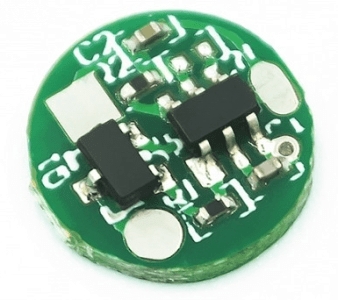
Description
What it is
This DC5V touch sensor switch is an electronic component designed to control devices like Arduino. Combined with a USB 10mm power supply and a DC inch mini mirror lamp, it is ideal for interactive lighting projects.
Features
- DC5V touch sensor switch
- USB 10mm power supply
- DC inch mini mirror lamp
- LED touch sensor switch
What it is for
This LED touch sensor switch is perfect for beginners and makers who want to add interactivity to their mirrors or small electronic projects. You can use it to create a small interactive mirror that turns on an LED when the edges are touched. Additionally, you can add an extra LED to create a lighting effect.
Tutorial: How to use LED Touch Sensor Switch
This touch LED sensor switch is ideal for interactive lighting projects. It is perfect for beginners and makers who want to add interactivity to their mirrors or small electronic projects.
What you need
- Arduino Uno
- USB Cable
- Connector Kit
- 5V Battery
- Additional LEDs (optional)
Steps
- Connect the touch LED sensor switch to the Arduino using the connectors.
- Check the power supply voltage (5V) and connect the USB 10mm power adapter.
- Connect the built-in LED to the touch LED sensor switch.
- Write the Arduino sketch to manage the touch sensor.
- Upload the code to the Arduino.
- Verify that the sensor responds correctly to touch contacts.
- If necessary, add an additional LED for visual effects.
- Test the complete system with various touches to ensure its efficiency.
Example code
void setup() {
  pinMode(A0, INPUT);
  pinMode(LED_BUILTIN, OUTPUT);
}

void loop() {
  if(digitalRead(A0) == HIGH) {
    digitalWrite(LED_BUILTIN, HIGH);
  } else {
    digitalWrite(LED_BUILTIN, LOW);
  }
}
Mini project
Create a small interactive mirror that turns on an LED when the edges are touched. You can add an additional LED to create a lighting effect.
Common mistakes
- Check that the power supply voltage is correct (5V).
- Ensure that the sensor is properly connected to the Arduino.
- Check that the integrated LED is properly connected.
- Ensure that the Arduino code is correct and loads correctly onto the Arduino.
Recommended accessories
- Arduino Uno
- Connector Kit
- 5V Battery
- Additional LEDs
Frequently asked questions
How can I control the touch sensor?
Use the Arduino input pin and the provided code to manage the sensor.
Which LEDs can I use?
You can use any LED that accepts a 5V voltage.
How can I add a lighting effect?
Add an additional LED and connect it to the Arduino output pin.
Reviews
There are no reviews yet.