 EN
 IT Italiano
 ES Español
 FR Français
 DE Deutsch
Description
What it is
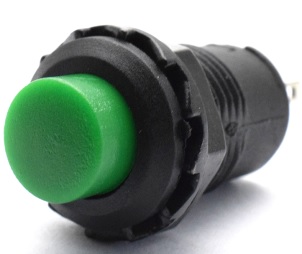
The Self-Locking Push Button 12mm Green PBS-11A is an electronic component that, once pressed, maintains active power until pressed again.
Features
- Dimensions: 12mm
- Color: Green
- Type: Self-Locking
- Quantity: 3 pieces
- SKU: ARD0011397
- Price: 1.97 €
What it is for
This button is ideal for electronic projects and Arduino that require temporarily locking a circuit. It can be used to create a simple power switch for an LED, a start/stop button for a device, or a switch to activate/deactivate a function.
Tutorial: How to Use Self-Locking Push Button 12mm Green PBS-11A
This self-locking button is ideal for projects that require temporarily locking a circuit. Useful for beginners and intermediates.
What you need
- Self-Locking Push Button 12mm Green PBS-11A
- Arduino or microcontroller
- Resistor (10kΩ)
- Test lead
Steps
- 1. Take the PBS-11A push button.
- 2. Identify the pins: GND, VCC, and OUT.
- 3. Connect GND to the GND pin of the microcontroller.
- 4. Connect VCC to the 5V pin of the microcontroller.
- 5. Connect OUT to a digital pin (e.g., D2).
- 6. Connect a 10kΩ resistor between OUT and VCC.
- 7. Check the datasheet for further details.
- 8. Load a sample code.
Example code
void setup() {}
void loop() {
  if (digitalRead(2) == HIGH) {
    Serial.println("Pulsante premuto");
  }
}
Mini project
Create a simple power switch for an LED.
Common mistakes
- Do not connect the button directly to the microcontroller without a resistor.
- Do not forget to check the datasheet.
- Connect GND to VCC.
- Do not use a resistor with a value different from 10kΩ.
Recommended accessories
- LED
- Resistor for LED
- 9V Battery
- Protective cases for components
Frequently asked questions
The button is not working?
Check the correct polarity of the connections and ensure there is a resistor between OUT and VCC.
Can I use another type of button?
Yes, but make sure it has the same specifications (12mm, pins GND, VCC and OUT).
Which pins to use?
You can use any digital pin, but D2 is recommended for compatibility.
Does the button work with Arduino Uno?
Yes, it works with Arduino Uno or any other compatible microcontroller.



Reviews
There are no reviews yet.