 EN
 IT Italiano
 ES Español
 FR Français
 DE Deutsch
Description
What it is
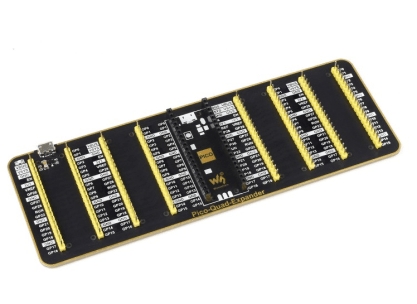
The Quad GPIO Expander for Raspberry Pi Pico is a module that allows expanding the number of GPIO pins available on the Raspberry Pi Pico, providing 16 additional GPIO pins. This module features four sets of male connectors and a USB power connector.
Features
- 16 additional GPIO pins
- Four sets of male connectors
- USB power connector
- Compatible with Raspberry Pi Pico
What it is for
The Quad GPIO Expander is ideal for electronic projects that require a larger number of GPIO pins, both digital and analog. It is particularly useful for beginner and intermediate makers who want to expand the capabilities of the Raspberry Pi Pico. It can be used to create simple alarm systems, interface with motion sensors, and control LEDs.
Tutorial: How to use Quad GPIO Expander for Raspberry Pi Pico
The Quad GPIO Expander for Raspberry Pi Pico is a useful module to expand the number of GPIO pins available on your Raspberry Pi Pico. Ideal for projects that require many digital or analog pins, it is perfect for beginner and intermediate makers.
What you need
- Raspberry Pi Pico
- Micro USB cable
- Quad GPIO Expander
- Test leads
- MicroSD (if needed)
Steps
- Connect the Quad GPIO Expander to the Raspberry Pi Pico using male connectors.
- Check the proper power supply of the module through the USB connector.
- Install the necessary library for the Quad GPIO Expander on the Raspberry Pi Pico.
- Configure the GPIO pins of the Quad GPIO Expander in your code.
- Test the module’s features with a simple code example.
- Verify the proper communication between the Raspberry Pi Pico and the Quad GPIO Expander.
- Execute a more complex project using the Quad GPIO Expander.
- Resolve any operational issues with the module.
Example code
import machine
import rp2

# Configurazione del modulo Quad GPIO Expander
expander = rp2.PIO(0)
expander.init()

# Configurazione dei pin GPIO
pin1 = machine.Pin(0, machine.Pin.OUT)
pin2 = machine.Pin(1, machine.Pin.IN)

# Esempio di utilizzo
pin1.value(1)
print('Pin 1 is high')
Mini project
Create a simple alarm system using the Quad GPIO Expander with motion detectors and LEDs.
Common mistakes
- GPIO pin configuration error.
- Power supply issues.
- Communication problems between the Raspberry Pi Pico and the Quad GPIO Expander.
- Use of incompatible connectors.
Recommended accessories
- Motion detectors
- RGB LEDs
- Resistors
- Connection cables
Frequently asked questions
What is the difference between this module and other expanders?
This module is specific to Raspberry Pi Pico and provides four sets of GPIO connector.
How can I control the module without a Raspberry Pi Pico?
The module is designed to be used exclusively with Raspberry Pi Pico.
How many additional GPIO pins can I get?
Check the datasheet for the exact GPIO pin configuration.
Reviews
There are no reviews yet.