 EN
EN IT Italiano
 ES Español
 FR Français
 DE Deutsch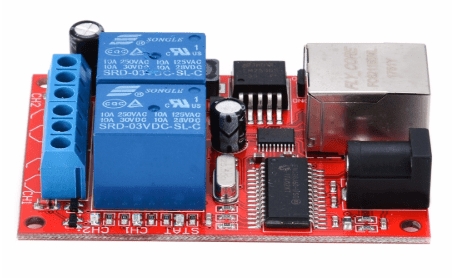
Description
What is the 2 Channel Ethernet Delay Relay Module? This electronic device allows you to remotely control electrical devices through an Ethernet network. It can be programmed to activate or deactivate devices after a certain delay, offering flexibility and precise control. Features:
– 2 channels for control
– Ethernet connection
– Remote control via network
– Programmable delay
– DC5V power supply
– TCP/UDP interface
– Integrated Web Server
What is it used for? This module is ideal for projects requiring remote management of electrical devices. Use it to create delayed lighting systems, remotely control appliances, automate industrial processes and more. Compatibility with Arduino and ESP can be verified in the datasheet.
Tutorial: How to use 2 Channel Ethernet Delay Relay Module
This module allows you to control electrical devices with a programmable delay via Ethernet connection. Useful for projects requiring remote management and programming.
What do you need?
– Arduino or compatible board
– Ethernet cable
– Relays to connect
– PC or smartphone with browser
Steps:
1. Connect the Ethernet module to your Arduino.
2. Connect the relay to the module, check the datasheet for output pins.
3. Install the Ethernet library in Arduino IDE.
4. Write code to initialise the Ethernet module.
5. Configure the desired delay for the relay.
6. Connect the module to an Ethernet network.
7. Access the web server of the module via browser.
8. Check the status and operation of the relay.
Example Code:
“`void setup() { Ethernet.begin(mac, ip); delay(1000); Serial.begin(9600); delay(1000);} void loop() { if (Ethernet.hardwareStatus() == EthernetNoHardware) { Serial.println(“Ethernet shield was not detected.nPlease check your wiring or Ethernet shield connection.”); while (1); } if (Ethernet.linkStatus() == LinkOFF) { Serial.println(“Ethernet cable is not connected.”); while (1); }}“`
Mini-project: Create a remote-controlled delayed lighting system. Connect the relay to the module and control the lighting via browser.
Common mistakes:
– Not verifying hardware before connecting the relay.
– Configuring Arduino code without installing Ethernet library.
– Incorrectly connecting the Ethernet module to a network.
– Forgetting to set the desired delay in the code.

Reviews
There are no reviews yet.