 EN
 IT Italiano
 ES Español
 FR Français
 DE Deutsch
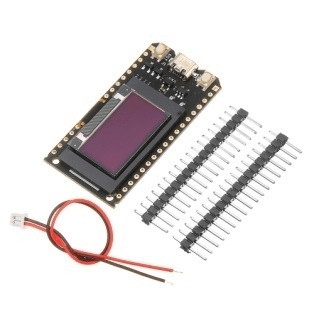
Description
What it is
The Pro ESP32 OLED V2.0 is a WiFi shield for ESP32 featuring a graphic OLED display. It is designed for projects requiring real-time data visualization and remote monitoring.
Features
- Compatible with ESP32
- Graphic OLED display
- Integrated WiFi connection
What it is for
The Pro ESP32 OLED V2.0 is ideal for projects such as stopwatches, real-time data viewers, sensor monitors, and IoT applications. It is suitable for both beginners and intermediate users.
Tutorial: How to use Pro ESP32 OLED V2.0
The Pro ESP32 OLED V2.0 is a small graphic display ideal for ESP32-based projects. Useful for beginners and intermediates.
What you need
- ESP32
- Arduino IDE
- FTDI cable
- Pro ESP32 OLED V2.0
- 10kΩ resistor
- Micro USB
Steps
- Check the datasheet for your ESP32 specifications.
- Download and install the Arduino IDE.
- Connect the Pro ESP32 OLED V2.0 to your ESP32 via the pins defined in the datasheet.
- Connect to your ESP32 with a Micro USB cable.
- Install the Adafruit_SSD1306 library via the Arduino Library Manager.
- Create a new sketch in your Arduino IDE.
- Insert the following code to initialize and display text on the screen:
- “`cpp
#include
#include#define SCREEN_WIDTH 128
#define SCREEN_HEIGHT 64Adafruit_SSD1306 display(SCREEN_WIDTH, SCREEN_HEIGHT, &Wire);
void setup() {
display.begin(SSD1306_SWITCHCAPVCC, 0x3C);
display.clearDisplay();
display.setTextSize(1);
display.setTextColor(SSD1306_WHITE);
display.setCursor(0, 0);
display.print(“Welcome!”);
display.display();
}void loop() {}
“` - Load the sketch onto your ESP32.
Example code
```cpp
#include <Wire.h>
#include <Adafruit_SSD1306.h>

#define SCREEN_WIDTH 128
#define SCREEN_HEIGHT 64

Adafruit_SSD1306 display(SCREEN_WIDTH, SCREEN_HEIGHT, &Wire);

void setup() {
  display.begin(SSD1306_SWITCHCAPVCC, 0x3C);
  display.clearDisplay();
  display.setTextSize(1);
  display.setTextColor(SSD1306_WHITE);
  display.setCursor(0, 0);
  display.print("Benvenuto!");
  display.display();
}

void loop() {}
```
Mini project
Create a simple stopwatch that displays the time on the OLED display.
Common mistakes
- Do not have incorrect or wrong connectors.
- Forget to install the Adafruit_SSD1306 library.
- Using an incompatible USB cable.
- Forget to connect the 10kΩ resistor.
Recommended accessories
- Temperature sensors
- LiPo battery
- Buttons
- Digital display 16×2
Frequently asked questions
How can I connect the OLED display?
Follow the instructions in the datasheet for correct connection.
What specifications does the display have?
Check the datasheet for complete specifications.
Can I use another library?
Yes, but make sure it is compatible with your ESP32.
Reviews
There are no reviews yet.