 EN
 IT Italiano
 ES Español
 FR Français
 DE Deutsch
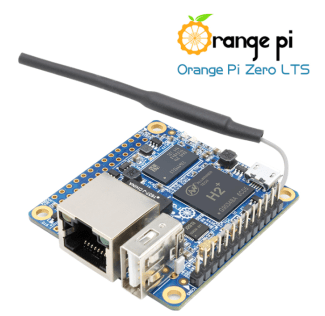
Description
What it is
Orange PI Zero256 H2 256MB is a small single-board computer based on the Allwinner H2 SoC. It is designed for small projects and for those starting to work with single-board systems.
Features
- SoC: Allwinner H2
- RAM: 256MB
- SKU: ARD0011728
- Price: 30.37 €
What it is for
The Orange PI Zero256 H2 256MB is suitable for small applications and lightweight projects. It can be used to configure a Python-based web server, for example with Flask to create a simple website that displays system information.
Tutorial: How to use Orange PI Zero256 H2 256MB
The Orange PI Zero256 H2 256MB is a small computer based on the Allwinner H2 SoC, ideal for small projects and for those starting with single-board systems. With 256MB of memory, it is suitable for small applications and lightweight projects.
What you need
- Orange PI Zero256 H2 256MB
- microSD card with installed operating system
- microUSB cable
- microUSB power supply
- HDMI monitor
- HDMI cable
Steps
- Check that the microSD card is formatted and that the operating system is installed correctly.
- Connect the microSD card to the Orange PI Zero256 H2 256MB.
- Connect the HDMI cable to the monitor and to the Orange PI Zero256 H2 256MB.
- Connect the microUSB cable to the power supply and to the Orange PI Zero256 H2 256MB.
- Turn on the Orange PI Zero256 H2 256MB.
- Install any system operating updates.
- Configure the operating system according to your needs.
- Test the connectivity and hardware features of the system.
Mini project
Set up a Python-based web server on Orange PI Zero256 H2 256MB. You can use Flask to create a simple website that displays system information.
Common mistakes
- Ensure that the microSD card is correctly formatted and that the operating system is installed.
- Check that the HDMI monitor is correctly connected and that the resolution is set correctly.
- Check for sufficient power supply.
- Verify the compatibility of the microUSB cable with the Orange PI Zero256 H2 256MB.
Recommended accessories
- MicroSD card with pre-installed operating system
- microUSB power supply 5V
- HDMI cable
- Wi-Fi connectivity kit
Frequently asked questions
What is the clock speed of the processor?
Check the datasheet.
How much memory space do I have available?
Check the datasheet.
What should I do if I cannot see anything on the monitor?
Check the HDMI connections and monitor configuration.
Reviews
There are no reviews yet.