 EN
 IT Italiano
 ES Español
 FR Français
 DE Deutsch
Description
What it is
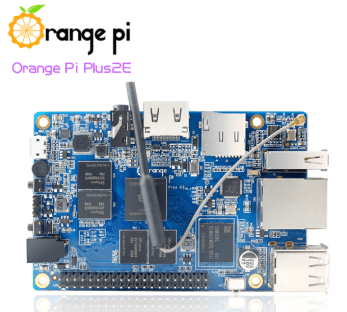
Orange PI Plus2E H3 2GB is a single-board computer (SBC) based on the Allwinner H3 processor. It offers high performance and a wide range of features for electronics and software development projects.
Features
- Processor: Allwinner H3
- RAM: 2GB
- SKU: ARD0011737
- Price: 102,37 €
What it is for
The Orange PI Plus2E H3 2GB is suitable for software development projects, data processing, and maker application creation. It can be used to create simple web servers with frameworks like Flask in Python, or for prototypes of complex electronic devices. Compatibility with Arduino and ESP is not specified in the name or hints.
Tutorial: How to use Orange PI Plus2E H3 2GB
The Orange PI Plus2E H3 2GB is a single-board computer ideal for software development projects, data processing, and maker application creation. Suitable for beginners and intermediates.
What you need
- Orange PI Plus2E H3 2GB
- Power Supply: 5V
- Monitor or HDMI screen
- HDMI cable
- USB keyboard and mouse
Steps
- 1. Connect the 5V power supply to the power port of the Orange PI.
- 2. Connect the HDMI cable to the HDMI port of the Orange PI and to your monitor.
- 3. Connect the keyboard and mouse to the USB port.
- 4. Turn on the power supply and the monitor.
- 5. Start the pre-installed operating system or install a custom one.
- 6. Configure WiFi or Ethernet network.
- 7. Install the necessary software for your projects.
- 8. Start developing or run your programs.
Mini project
Create a simple web server using a web framework like Flask in Python. In 30 minutes you can have a working server.
Common mistakes
- Do not use incompatible power supplies.
- Make sure the HDMI cable is properly inserted.
- Do not connect the power supply before the monitor.
- Check the datasheet if your software requires specific versions of drivers.
Recommended accessories
- 5V power supply
- HDMI cable
- SD Card with operating system
- USB keyboard and mouse
Frequently asked questions
How can I install a different operating system?
Check the datasheet for the SD port specifications and insert a card with the desired operating system.
My monitor does not recognize the Orange PI, what can I do?
Make sure the HDMI cable is properly connected and that the power supply is correct.
Which drivers do I need to install?
Check the datasheet for any specific drivers that need to be installed.
Can you recommend some software to start with?
We recommend Python and its Flask framework to create a web server.
Reviews
There are no reviews yet.