 EN
 IT Italiano
 ES Español
 FR Français
 DE Deutsch
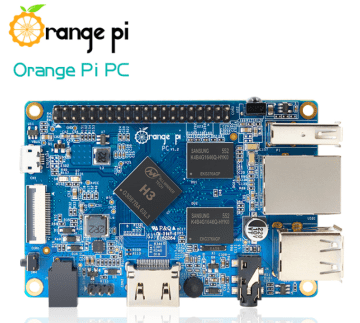
Description
What it is
Orange PI PC H3 1GB is a small computer based on the Allwinner H3 processor, designed for makers and developers. It offers performance and features similar to Raspberry Pi, but at a more affordable price.
Features
- SoC: Allwinner H3
- RAM: 1 GB
- SKU: ARD0011734
- Price: 95.22 €
What it is for
The Orange PI PC H3 1GB is ideal for Raspberry Pi projects, 3D printing, embedded software development, and web services. It can be used to create local web servers, IoT applications, and control systems.
Tutorial: How to use Orange PI PC H3 1GB
The Orange PI PC H3 1GB is a small computer based on the Allwinner H3 SoC, ideal for Raspberry Pi projects, 3D printing, and web services. This tutorial will guide you through the initial steps to start using it.
What you need
- Orange PI PC H3 1GB
- USB to micro USB connection
- MicroSD card with pre-installed operating system
- USB power supply
- Monitor or TV with HDMI connector
- Wi-Fi or Ethernet Connection (optional)
Steps
- Connect the microSD card to the computer to format it and install the operating system.
- Insert the microSD card into the Orange PI PC H3.
- Connect the Orange PI PC H3 to the monitor or TV via the HDMI connector.
- Power the Orange PI PC H3 with the USB power supply.
- Access the operating system and verify Wi-Fi or Ethernet connectivity (check the datasheet for network specifications).
- Install any system operating system updates.
- Configure system settings as needed.
- Explore the operating system features and start creating projects.
Mini project
Create a local web server with Apache and Python Flask.
Common mistakes
- Wi-Fi or Ethernet connectivity issues (check the datasheet for network specifications).
- microSD card recognition issues.
- Video resolution issues.
- Insufficient power supply issues.
Recommended accessories
- MicroSD card with pre-installed operating system
- USB power supply
- HDMI cable
- Protective case for Orange PI PC H3
Frequently asked questions
How can I install an operating system on Orange PI PC H3?
Use a tool like Win32DiskImager to write an operating system onto a microSD card.
Which operating systems are supported?
Orange PI PC H3 primarily supports Linux, such as Armbian or DietPi.
How can I access the remote terminal?
Configure SSH on the installed operating system and use an SSH client to access it.
Reviews
There are no reviews yet.