 EN
 IT Italiano
 ES Español
 FR Français
 DE Deutsch
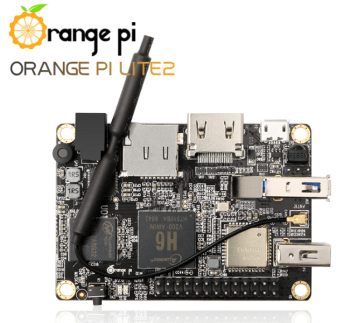
Description
What it is
Orange PI Lite2 H6 1GB is a small computer based on an ARM processor, suitable for makers and developers.
Features
- Processor: ARM H6
- RAM: 1GB
- SKU: ARD0011740
- Price: 61.87 €
What it is for
The Orange PI Lite2 H6 1GB can be used to develop and prototype electronic and robotic projects. It is ideal for creating embedded systems, software, and robots, even for IoT applications. Example use: create a control system for an LED with a button.
Tutorial: How to use Orange PI Lite2 H6 1GB
The Orange PI Lite2 H6 1GB is a small computer based on ARM, ideal for software development projects, creating embedded systems, and as a base for creating robots and IoT systems.
What you need
- Orange PI Lite2 H6 1GB
- USB Power Supply (5V/2.5A)
- Monitor or HDMI screen
- HDMI cable
- Reset button
Steps
- 1. Plug the USB power supply into the USB-C port at the back of the Orange PI.
- 2. Connect the HDMI cable to the HDMI port at the front of the Orange PI.
- 3. Connect the HDMI cable to your monitor or screen.
- 4. Turn on the USB power supply.
- 5. Press the reset button to start the boot process.
- 6. Wait for the operating system to load.
- 7. Connect the Orange PI to the Internet to update the system.
- 8. Install your preferred software development environment.
Mini project
Create a simple control system for an LED with a button. Connect an LED and a button to the Orange PI and write a simple Arduino sketch to control the state of the LED.
Common mistakes
- Forgetting to connect the power supply correctly.
- Not waiting for the operating system to load completely.
- Not connecting the LED and button pins correctly.
- Not installing a software development environment.
Recommended accessories
- Arduino UNO
- LED
- Button
- Resistor
Frequently asked questions
How can I access the firmware of the Orange PI?
Check the datasheet for further information on how to access the firmware.
Which operating systems does the Orange PI Lite2 H6 1GB support?
Check the datasheet for the list of supported operating systems.
Does the Orange PI need a cooler?
Check the datasheet for the operating temperature and decide if a cooler is needed.
Can it work with a different USB power supply?
Check the datasheet for the required power and choose a compatible power supply.

Reviews
There are no reviews yet.