 EN
 IT Italiano
 ES Español
 FR Français
 DE Deutsch
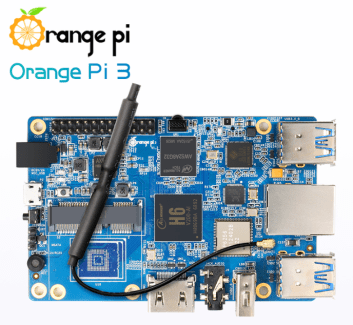
Description
What it is
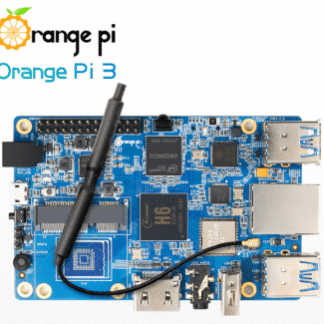
Orange PI Pi 3-2G H6 is a single-board computer with an ARM Cortex-A53 processor, designed for software development and robotics projects.
Features
- Processor: ARM Cortex-A53
- RAM: 2 GB
- Connectivity: Ethernet, Wi-Fi, Bluetooth
- Operating System: Linux
What it is for
Orange PI Pi 3-2G H6 is versatile and can be used for IoT projects, software development, and Linux-based applications. It is suitable for both beginner and intermediate makers. Examples of use: create a simple web server with Node.js in a short time.
Tutorial: How to use Orange PI Pi 3-2G H6
The Orange PI Pi 3-2G H6 is a versatile single-board computer ideal for IoT projects, software development, and Linux-based applications. Useful for beginner and intermediate makers.
What you need
- Orange PI Pi 3-2G H6
- microSD Adapter
- Monitor or HDMI Screen
- Mouse and Keyboard
- USB Cable
Steps
- 1. Mount the microSD with your preferred OS (e.g., Raspbian) in the dedicated slot.
- 2. Connect the USB cable to a USB power source.
- 3. Connect the HDMI cable to the monitor or screen.
- 4. Turn on the computer by pressing the power button.
- 5. Configure the WiFi or Ethernet connection.
- 6. Install the necessary drivers for external devices.
- 7. Start the operating system and log in to the console.
- 8. Configure the hostname, network, and other system parameters.
Mini project
Create a simple web server with Node.js in 30 minutes.
Common mistakes
- Forget to mount the microSD card.
- Connect the USB cable to an insufficient power supply.
- Do not configure the WiFi or Ethernet connection.
- Ignore the initial system configuration.
Recommended accessories
- MicroSD card with operating system
- microSD adapter
- HDMI monitor or screen
- Mouse and keyboard
Frequently asked questions
How can I access the console if I see nothing on the screen?
Make sure the HDMI cable is properly connected and that the operating system is in graphical mode. If it doesn’t work, try using a remote terminal.
Which drivers should I install for external devices?
Check the datasheet for specific drivers. Generally, the standard Linux drivers should work.
Can I use this Orange PI as a network server?
Yes, it can be configured as a web server, FTP server, and more. Install and configure the desired services.
Reviews
There are no reviews yet.