 EN
 IT Italiano
 ES Español
 FR Français
 DE Deutsch
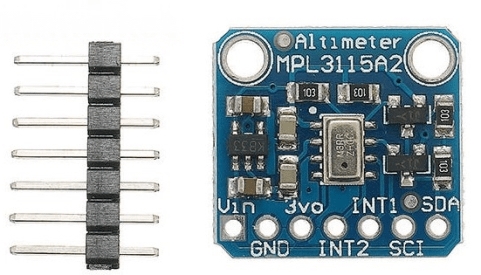
Description
What it is
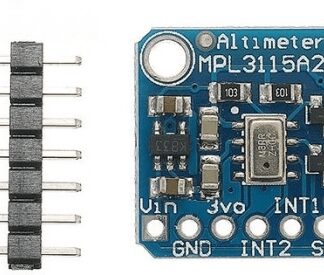
The MPL3115A2 IIC I2C is a sensor that measures altitude, pressure, and temperature. It relies on I2C technology for communication with microcontrollers. Version V2.0 offers improved performance over the previous model.
Features
- Measures altitude, pressure, and temperature
- I2C communication
- Check datasheet: version V2.0
- Check datasheet: pressure measurement range
- Check datasheet: altitude measurement accuracy
What it is for
The MPL3115A2 is ideal for Arduino projects and environmental monitoring systems. It can be used to create digital altimeters, weather forecasting systems, pressure sensors for industrial applications, and much more. Its compatibility with Arduino and other microcontrollers makes it a versatile choice for a wide range of applications.
Tutorial: How to use MPL3115A2
The MPL3115A2 sensor measures pressure, temperature, and altitude. Useful for weather projects, altimeters, and environmental control systems.
What you need
- Arduino
- I2C cable (SCL and SDA)
- Pull-up resistor (10kΩ)
- Microcontroller with I2C interface
Steps
- 1. Connect the I2C cable (SCL and SDA) to the microcontroller and the sensor.
- 2. Attach a pull-up resistor (10kΩ) between SCL and VCC.
- 3. Connect the GND of the sensor to the GND of the microcontroller.
- 4. Load the provided Arduino code.
- 5. Check the datasheet for I2C configuration.
- 6. Configure the sensor to measure pressure, temperature, and altitude.
- 7. Display the data on the serial monitor.
- 8. Test the sensor in various environmental conditions.
Example code
```
#include <Wire.h>
#include <Adafruit_MPL3115A2.h>

Adafruit_MPL3115A2 mpl3115a2;

void setup() {
  Serial.begin(9600);
  if (!mpl3115a2.begin()) {
    Serial.println("Failed to find MPL3115A2 sensor!");
    while (1);
  }
}

void loop() {
  int32_t altitude = mpl3115a2.getAltitude();
  int32_t pressure = mpl3115a2.getPressure();
  float temperature = mpl3115a2.getTemperature();
  Serial.print("Altitude: "); Serial.println(altitude);
  Serial.print("Pressure: "); Serial.println(pressure);
  Serial.print("Temperature: "); Serial.println(temperature);
  delay(1000);
}
```
Mini project
Create a simple digital altimeter using the MPL3115A2 sensor. Connect the sensor to the Arduino and display the altitude on an LCD screen.
Common mistakes
- Forget the pull-up resistor.
- Connect the I2C pins in reverse.
- Do not configure the sensor correctly.
- Use a microcontroller without I2C interface.
Recommended accessories
- LCD Display
- Arduino UNO
- USB Cable
- Jumper Cable
Frequently asked questions
The sensor is not working, what should I do?
Check the I2C connectivity and microcontroller configuration.
Can I use this sensor with a Raspberry Pi microcontroller?
Yes, but make sure the Raspberry Pi supports the I2C interface.
The sensor is not correctly detecting altitude, why?
Check the sensor configuration and position. It may be influenced by environmental factors.
Reviews
There are no reviews yet.