 EN
 IT Italiano
 ES Español
 FR Français
 DE Deutsch
Description
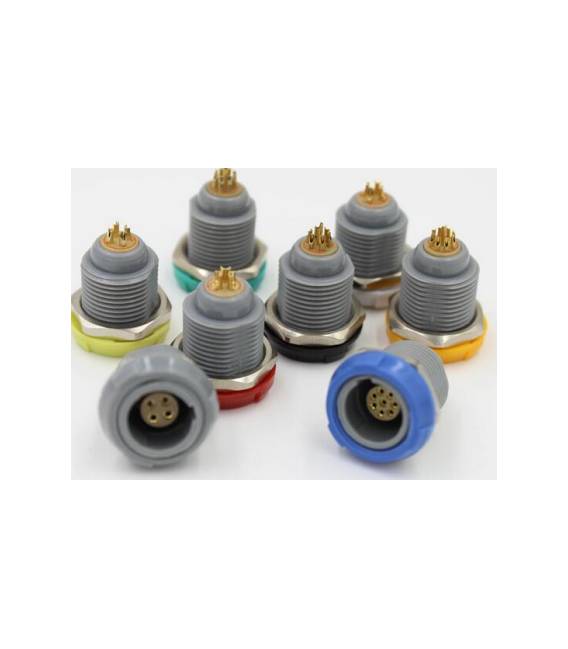
Tutorial: How to Use Lemo PKG Connector Socket 4P
This connector is ideal for safely and flexibly connecting electronic circuits. Useful for beginners and intermediate level projects.
What you need
- Lemo PKG Connector Socket 4P
- Compatible cable (check the datasheet)
Steps
- 1. Identify the pins of the circuit to be connected.
- 2. Prepare the compatible cable (check the datasheet).
- 3. Insert the cable into the connector.
- 4. Ensure the connector is securely in place.
- 5. Connect to the main circuit.
- 6. Verify connectivity with a multimeter.
- 7. Test the circuit to ensure it works correctly.
- 8. If necessary, protect the connector with a crimping tool.
Mini project
Build a simple lighting circuit with a button and an LED. Connection of the button to the connector and connection of the LED.
Common mistakes
- Insert the cable into the connector incorrectly.
- Omit connectivity verification.
- Do not use a wire stripper to protect the connector.
- Connect the connector to a circuit without testing it first.
Recommended accessories
- Compatible cable
- Multimeter
- Wire stripper
- Pliers for cutting cable
Frequently asked questions
Can I use any cable for this connector?
Check the datasheet for compatibility.
Is it necessary to protect the connector?
Protecting the connector with a wire stripper is recommended.
Can I use this connector with Arduino?
Yes, it is compatible with most electronic circuits.
How long does it take to connect the connector?
Connecting should take less than 5 minutes.

Reviews
There are no reviews yet.