 EN
 IT Italiano
 ES Español
 FR Français
 DE Deutsch
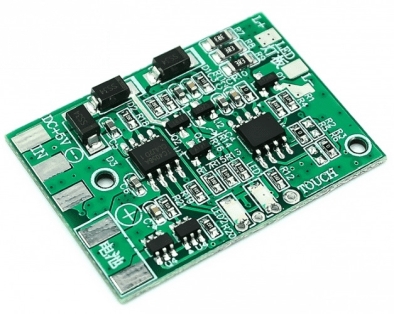
Description
What it is
The DC LED with recharge protection is a control board for table lamps ideal for DIY projects and repairs. This component allows the creation of a personalized desk lamp with touch control.
Features
- Allows touch dimming
- Suitable for creating universal desk lamps
- Allows DIY repair of existing lamps
What it is for
This component is perfect for anyone who wants to illuminate their workspace in a personalized way. It can be used in home or lab lighting projects. Check the datasheet for further details on compatibility with Arduino or ESP.
Tutorial: How to use DC LED with Recharge Protection
This DC LED with recharge protection is ideal for anyone who wants to create a personalized desk lamp with touch control. It is perfect for home or lab lighting projects.
What you need
- Arduino Uno
- DC LED with recharge protection
- breadboard
- connecting cables
- resistors
- touch sensors
Steps
- Connect the DC LED with recharge protection to the breadboard.
- Connect the Arduino Uno to the computer via the USB connector.
- Connect the LED circuit to the Arduino microcontroller.
- Write the Arduino sketch to manage touch control.
- Upload the sketch to the Arduino microcontroller.
- Verify the operation of the DC LED with recharge protection.
- Adjust the light level using the touch sensor.
- Test the recharge protection of the DC LED to ensure battery safety and longevity.
Example code
void setup() {
  pinMode(A0, INPUT);
  pinMode(9, OUTPUT);
}

void loop() {
  int val = analogRead(A0);
  analogWrite(9, val);
}
Mini project
Create a personalized desk lamp with touch control in 30 minutes. Use the DC LED with recharge protection to light up your workspace.
Common mistakes
- Do not properly verify the recharge protection of the DC LED.
- Use inappropriate resistors for the DC LED.
- Do not connect the touch sensor correctly.
- Do not write the Arduino sketch to handle touch control.
Recommended accessories
- Arduino Uno
- Breadboard
- Touch sensors
- Connecting cables
Frequently asked questions
How can I adjust the brightness of the DC LED?
Use the provided Arduino sketch to adjust the brightness of the DC LED via the touch sensor.
What batteries can I use with the DC LED?
Check the DC LED datasheet to determine compatible battery types.
Reviews
There are no reviews yet.