 EN
 IT Italiano
 ES Español
 FR Français
 DE Deutsch
Description
What it is
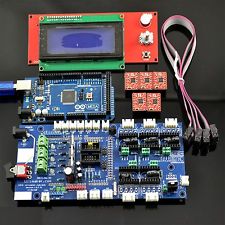
The H037 Ultimaker1.57 is a complete kit for building a RepRap 3D printer, based on Arduino Mega 2560 and equipped with an LCD controller 2004 and five A4988 drivers.
Features
- Ultimaker1.57 Panel
- Arduino Mega 2560
- LCD controller 2004 included
- Five A4988 drivers with heat sink
What it is for
The components in this kit are ideal for anyone who wants to start building a RepRap 3D printer. The LCD controller and A4988 drivers allow for excellent management of the printer’s stepper motors.
Tutorial: How to use Ultimaker1.57 + Mega 2560 Starter Kit
This kit is ideal for anyone who wants to start building a RepRap 3D printer. Includes an LCD controller 2004 and five A4988 drivers to properly manage the printer’s stepper motors.
What you need
- Arduino Mega 2560
- LCD screen 2004
- five stepper motor drivers A4988
Steps
- 1. Connect the LCD screen 2004 to the correct pin of the Arduino Mega 2560.
- 2. Check the connections between Arduino and the five A4988 drivers (refer to the datasheet).
- 3. Download and install the LiquidCrystal library for controlling the LCD display.
- 4. Load the example sketch provided with the LiquidCrystal library onto the Arduino Mega 2560.
- 5. Test the graphical interface of the SSD1306 on the LCD display (refer to the datasheet).
- 6. Configure the A4988 drivers to properly manage the stepper motors of the 3D printer (refer to the datasheet).
- 7. Test the functionality of the stepper motors through the 3D printer control software.
- 8. Optimize the settings of the A4988 driver based on the specifications of your 3D printer.
Example code
// Includi la libreria LiquidCrystal
#include <LiquidCrystal.h>
// Definisci i pin di connessione per il display LCD
LiquidCrystal lcd(12, 11, 5, 4, 3, 2);
void setup() {
  // Inizializza il display LCD
  lcd.begin(16, 2);
  lcd.print("Benvenuto!");
}
Mini project
Create a basic configuration RepRap 3D printer prototype and print a simple object.
Common mistakes
- Incorrect connections between Arduino and LCD display.
- Non-optimized settings of the A4988 drivers for stepper motors.
Recommended accessories
- Jumper Wire
- USB Connection for Arduino Mega 2560
- 3D Printer RepRap Kit
Frequently asked questions
How can I configure the LCD display?
Install the LiquidCrystal library and configure the correct pins in your sketch.
What are the recommended settings for the A4988 drivers?
Check the datasheet of the A4988 module to optimize your configurations.
Reviews
There are no reviews yet.