 EN
 IT Italiano
 ES Español
 FR Français
 DE Deutsch
Description
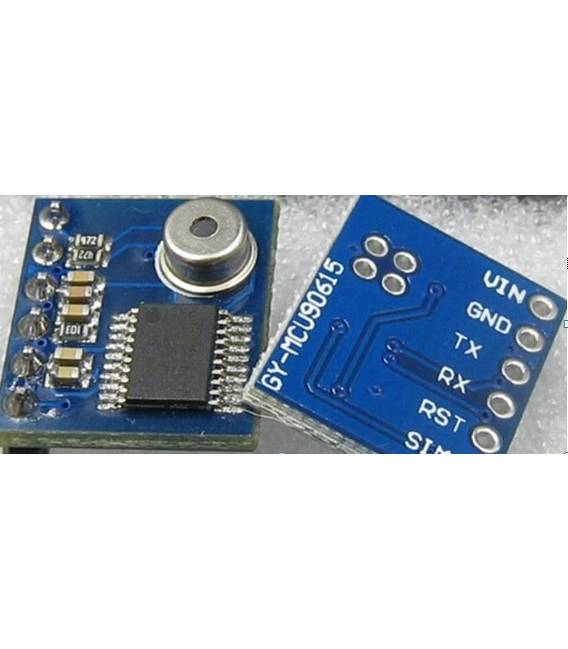
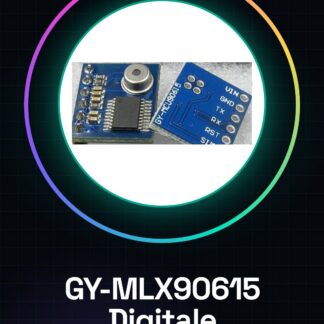
GY-MLX90615 MLX90615 Digital Infrared Temperature Sensor
Serial port to send the command byte:
(1), serial communications parameters (baud default value 115200 bps, can be set by software)
Baud Rate: 9600 bps parity bit: N Data bits: 8 Stop bits: 1
Baud rate: 115200 bps parity bit: N Data bits: 8 Stop bits: 1
(2), the module input commands sent by an external controller to the GY-MCU90615 module (hex)
1, header: 0xa5
Instruction format: header + command + checksum (8bit) (such as automatic read temperature command = 0xA5 + 0x45 + 0xEA)
2, the command instruction:
Continuous output instruction:
0xA5 + 0x45 + 0xEA —————- temperature data (module returns data type 0x45)
Query output instructions:
0xA5 + 0x15 + 0xBA ————— temperature data (module returns data type 0x45)
🙁 Configuration directives take effect after power-down restart)
Baud rate configurations:
0xA5 + 0xAE + 0x53 ————— 9600
0xA5 + 0xAF + 0x54 ————— 115200 (default)
Is powered automatically send temperature data configuration:
0xA5 + 0x51 + 0xF6 ————— output temperature data automatically after power
0xA5 + 0x52 + 0xF7 ————— not automatically after power output temperature data (default)
letter of agreement
Serial port to receive:
(1), serial communications parameters (baud default value 115200 bps, can be set by software)
Baud Rate: 9600 bps parity bit: N Data bits: 8 Stop bits: 1
Baud rate: 115200 bps parity bit: N Data bits: 8 Stop bits: 1
(2), the module output format, each frame contains nine bytes (hex):
Byte0: 0x5A Preamble Flags
Byte1: 0x5A Preamble Flags
Byte2: 0X45 The frame data types (0X45: temperature data)
Byte3: 0x04 amount of data (data 2 the following four groups, for example)
Byte4: 0x00 ~ 0xFF Data 1 high 8
Byte5: 0x00 ~ 0xFF Data 1 low 8
Byte6: 0x00 ~ 0xFF Data 2 high 8
Byte8: 0x00 ~ 0xFF checksum (data accumulation and front, leaving only the lower 8 bits)
(3), data calculation method
Temperature calculation method:
High temperature = 8 << 8 | Low 8 (results for the actual angle multiplied by 100)
Example: Send command: A5 45 EA, received a data:
<5A- 5A- 45- 04- 0C- 78- 0D- 19- A7>
Represent TO (signed 16bit, represents the target temperature): TO = 0x0C78 / 100 = 31.92 ℃
Represents TA (signed 16bit, represents the ambient temperature): TA = 0x0D19 / 100 = 33.53 ℃
Tutorial: How to use GY-MLX90615
This infrared sensor measures temperature without contact, ideal for environmental monitoring projects and security applications.
What you need
- GY-MLX90615
- Arduino
- Dual cable
- 10kΩ resistor
Steps
- 1. Connect the sensor to the Arduino using the following pins: VCC to 5V, GND to GND, SDA to SDA, SCL to SCL.
- 2. Connect the 10kΩ resistor between VCC and SDA.
- 3. Load the provided Arduino code.
- 4. Run the code to display the temperature.
- 5. Check the datasheet for further details.
- 6. Try measuring the temperature of various objects.
- 7. Record the data for subsequent analysis.
- 8. Verify the stability of the sensor in different environmental conditions.
Example code
```int sensorPin = 2; // Pin SDA di MLX90615void setup() { Wire.begin(); Serial.begin(9600);}void loop() { int sensorValue = MLX90615.getobjectTemp(); Serial.println(sensorValue); delay(1000);}```Mini project
Create a thermal alert system for your home door.
Common mistakes
- Connect the sensor to an unsupported pin.
- Omit the 10kΩ resistor.
- Use an incompatible Arduino.
- Forget to check the datasheet.
Recommended accessories
- Arduino Uno
- Dual cable
- 10kΩ resistor
- LCD display
Frequently asked questions
Does the sensor work well in all environmental conditions?
Check the datasheet for operating conditions.
Can I use an Arduino from another brand?
Yes, but make sure it is compatible with the SDA and SCL pins.
Does the sensor measure the air temperature or the temperature of an object?
Measures the temperature of an object in contact.
Reviews
There are no reviews yet.