 EN
 IT Italiano
 ES Español
 FR Français
 DE Deutsch
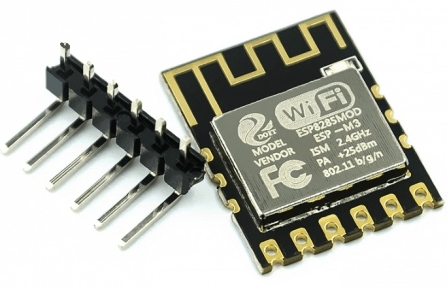
Description
What it is
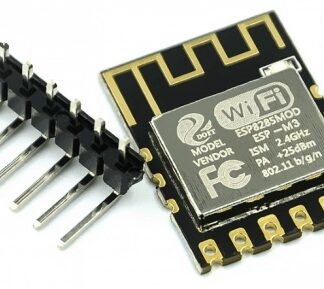
The ESP8285 WiFi module is a small device that allows you to connect your Arduino project to a WiFi network.
Features
- WiFi Connectivity
- Wireless Serial Transmission
- Compatible with ESP8266
- Ultra-Small Dimensions
What it is for
The ESP8285 module can be used to send and receive wireless data from an Arduino project. For example, you can create a temperature sensor that sends data via WiFi to your computer. It can also be used to control remote devices via WiFi. It is compatible with Arduino and other ESP8266-based microcontrollers.
Tutorial: How to Use ESP8285 WiFi Module
The ESP8285 WiFi module is a small device that allows you to connect your Arduino project to a WiFi network. Ideal for beginners and small-sized projects.
What you need
- Arduino Uno or Compatible
- USB Cable
- Stable WiFi Connection
Steps
- Connect the ESP8285 module to the Arduino using GPIO connectors
- Install the ESP8266WiFi library through the Arduino IDE
- Load the example sketch to establish a WiFi connection
- Check the connection by monitoring the status LED on the module
- Try sending data from your computer to the Arduino via the WiFi network
Example code
void setup() {
  Serial.begin(9600);
  WiFi.begin("SSID", "PASSWORD");
  while (WiFi.status() != WL_CONNECTED) {
    delay(500);
    Serial.print(".");
  }
  Serial.println("nConnesso!");
}
Mini project
Create a temperature sensor that sends data via WiFi. Use a DHT11 sensor and the ESP8285 module to send temperature and humidity data to your computer.
Common mistakes
- WiFi connection error: check that you have entered the SSID and password correctly
- Power issues: ensure that the module is adequately powered
- Connectivity issues: check GPIO connections
- Compilation error: verify that the library is installed correctly
Recommended accessories
- DHT11 Sensor
- LiPo Battery
- Relay to control external devices
- OLED Display
Frequently asked questions
Is the module compatible with ESP8266?
Yes, it is compatible with ESP8266 and can use the same libraries.
How can I update the firmware?
Check the datasheet for detailed instructions.
Can it work with USB power?
Yes, but check the minimum voltage requirement on the datasheet.
Reviews
There are no reviews yet.