 EN
 IT Italiano
 ES Español
 FR Français
 DE Deutsch
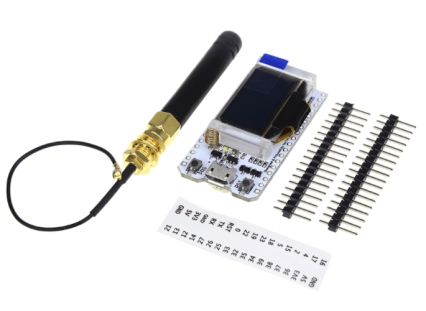
Description
What it is
SX1276 ESP32 IoT 868MHz-915MHz is an ESP32 platform shield that integrates an SX1276 radio module for long-range communication. It allows wireless connection of devices, expanding the ESP32’s functionality with radio communication.
Features
- SX1276 radio module for 868-915 MHz communication
- Compatible with ESP32
- Integrates WiFi and Bluetooth
What it is for
Ideal for IoT projects that require WiFi and Bluetooth connectivity, as well as long-range radio communication. It can be used to create home alarm systems, environmental sensors, remote monitoring, and other projects that need long-range wireless communication.
Tutorial: How to use SX1276 ESP32 IoT 868MHz-915MHz
The SX1276 ESP32 IoT shield is ideal for IoT projects that require WiFi and Bluetooth connectivity, as well as long-range radio communication. It is suitable for both beginners and more experienced developers.
What you need
- Computer with Arduino IDE installed
- USB Type-A to Micro-USB cable
- SX127x libraries for Arduino
- Serial monitor software
- ESP32 development software
Steps
- Connect the SX1276 ESP32 IoT shield to your computer via USB cable
- Install the SX127x and ESP32 libraries in your Arduino IDE
- Upload the example sketch for the SX1276 to the ESP32 module
- Check WiFi and Bluetooth communication through the serial monitor
- Configure the transmission frequency between 868MHz and 915MHz
- Test radio communication with another SX1276 module
- Implement data reception and transmission functionality
- Test WiFi and Bluetooth connectivity with an app or server
Example code
/*
* Minimo esempio di codice per la SX1276 ESP32 IoT
*/
#include <SPI.h>
#include <SX127x.h>

SX127x sx127x;

void setup() {
  sx127x.init();
  sx127x.setFrequency(915.0); // Verifica sul datasheet la frequenza corretta
}

void loop() {
  // Codice di trasmissione/ricezione dati
}
Mini project
Create a home security system that sends notifications via WiFi and Bluetooth when a motion sensor is triggered.
Common mistakes
- WiFi or Bluetooth connection issues due to incorrect configuration
- Data transmission error due to an invalid frequency
- Insufficient power supply issues causing module instability
- SX1276 module configuration error preventing communication
Recommended accessories
- PIR motion sensor
- LiPo battery for portable power supply
- External antenna to improve radio range
- OLED display to view real-time data
Frequently asked questions
What is the difference between 868MHz and 915MHz?
The difference is in the frequency band used: 868MHz is for Europe, while 915MHz is for North America.
How can I monitor radio communication?
Use a radio monitoring software like SDRSharp or Gqrx.
What is the maximum range of radio communication?
The range may vary, check the datasheet for your specific configuration.
Reviews
There are no reviews yet.