 EN
 IT Italiano
 ES Español
 FR Français
 DE Deutsch
Description
Technical Description
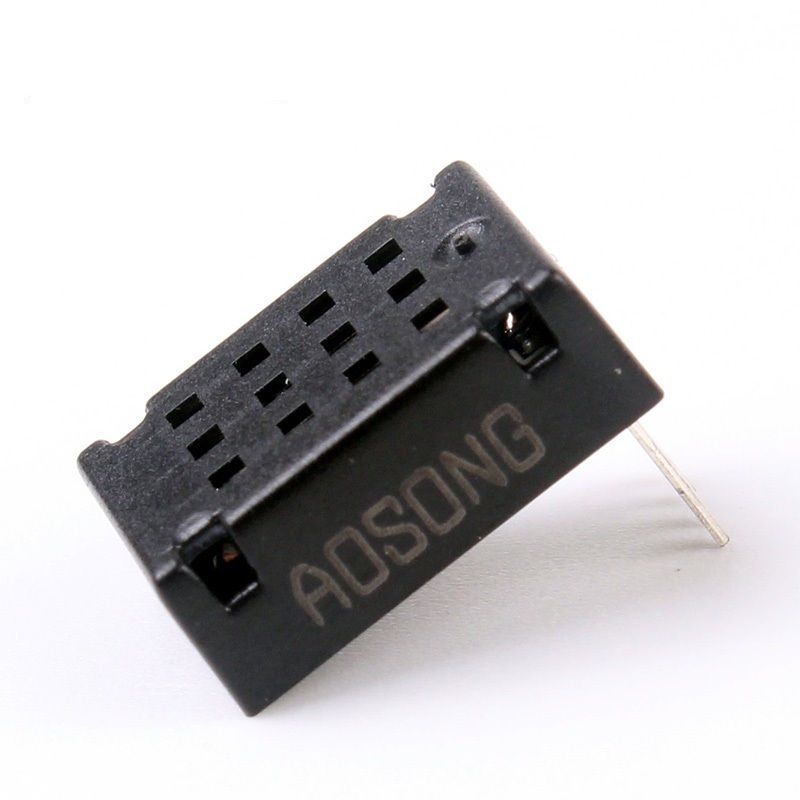
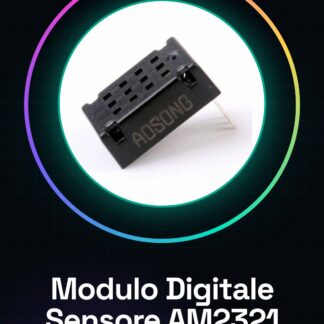
The digital sensor module AM2321 is a device used for digital measurement of temperature and humidity. It easily connects to microcontroller systems like Arduino for data collection and transmission. The sensor communicates via I2C protocol, offering precise and reliable readings of environmental parameters.
Due to its simple integration and accuracy, the AM2321 module is suitable for various projects requiring temperature and humidity monitoring, such as excessive humidity alarm systems or environmental control systems.
During installation, it is important to verify that the sensor is properly powered and that the I2C connections are securely made to ensure proper communication with the microcontroller.
Key Specifications
| Parameter | Value |
| Model | AM2321 |
| Quantity | 1 |
| Supply Voltage | N/A (see manufacturer’s datasheet) |
| Interface | I2C |
| Dimensions | N/A (see manufacturer’s datasheet) |
| Container | N/A (see manufacturer’s datasheet) |
Installation and Usage
- Connect the VCC pin of the AM2321 sensor to the Arduino power supply (5V or 3.3V).
- Connect the GND pin of the sensor to the Arduino ground.
- Connect the SDA pin of the sensor to the Arduino SDA connector (A4).
- Connect the SCL pin of the sensor to the Arduino SCL connector (A5).
- Install the Wire or Adafruit Unified Sensor library via the Arduino IDE and upload the example sketch to test the sensor.
Compatibility and Requirements
- The AM2321 module is compatible with microcontroller systems such as Arduino and Raspberry Pi.
- A support software for I2C communication is required for the use of the sensor.
- A USB cable is required for installation to connect to the PC.
Limitations and Important Notes
- The AM2321 sensor is not designed for use in extreme or outdoor environments.
- Measurement accuracy may vary in conditions of very high or low humidity.
- It is important to verify the correct power supply voltage to avoid damaging the sensor.
Troubleshooting
The sensor is not detected.
Probable cause: Unstable I2C connections.
Solution: Check and reconnect the SDA and SCL connectors.
Incorrect temperature and humidity values.
Probable cause: Extreme environmental conditions.
Solution: Check environmental conditions and repeat the measurement.
Sensor initialization error.
Probable cause: Incorrect power supply voltage.
Solution: Check the power supply voltage and reconnect the sensor.
Data not updated.
Probable cause: Too short read interval.
Solution: Increase the delay between readings.
Use cases
Excess Humidity Alarm System
Objective: Send alarms when humidity exceeds a set threshold.
What is needed: Arduino, AM2321 module, USB connector, I2C communication software.
Steps: 1) Connect the AM2321 module to the Arduino. 2) Load the example sketch for data reading. 3) Configure an alarm based on a specific humidity value.
Expected result: The system sends an alarm when the humidity exceeds the set threshold.
Temperature Control in a Vivarium
Objective: Continuous temperature monitoring to maintain a stable environment.
What is needed: Arduino, AM2321 module, LCD display, I2C communication software.
Steps: 1) Connect the AM2321 module and the LCD display to the Arduino. 2) Load the example sketch for data reading. 3) Configure the LCD display to show the temperature.
Expected result: The temperature is monitored and displayed in real-time.
Temperature control system in a room
Objective: Adjust the air conditioning or heating based on temperature.
What’s needed: Arduino, AM2321 module, relay, I2C communication software.
Steps: 1) Connect the AM2321 module and the relay to the Arduino. 2) Load the example sketch for data reading. 3) Configure the relay to adjust the air conditioning or heating.
Expected result: The system adjusts the air conditioning or heating based on temperature.
Temperature and humidity monitoring system in a laboratory
Objective: Collect temperature and humidity data for documentation.
What’s needed: Arduino, AM2321 module, I2C communication software.
Steps: 1) Connect the AM2321 module to the Arduino. 2) Load the example sketch for data reading. 3) Configure the system to send data to a database.
Expected result: Temperature and humidity data are collected and stored in a database.
Temperature monitoring system in a refrigerator
Objective: To verify that the refrigerator’s temperature is adequate.
What is needed: Arduino, AM2321 module, I2C communication software.
Steps: 1) Connect the AM2321 module to the Arduino. 2) Load the example sketch for data reading. 3) Configure the system to send alerts if the temperature is too high or low.
Expected result: The system sends alerts if the refrigerator’s temperature is out of the set limits.
Temperature monitoring system in a water tank
Objective: To verify that the water’s temperature is adequate.
What is needed: Arduino, AM2321 module, I2C communication software.
Steps: 1) Connect the AM2321 module to the Arduino. 2) Load the example sketch for data reading. 3) Configure the system to send alerts if the temperature is too high or too low.
Expected result: The system sends alerts if the water temperature is out of the set limits.
Temperature and humidity monitoring system for a physics lab
Objective: Collect temperature and humidity data for experiments.
What is needed: Arduino, AM2321 module, I2C communication software.
Steps: 1) Connect the AM2321 module to the Arduino. 2) Load the example sketch for data reading. 3) Configure the system to send data to a computer.
Expected result: Temperature and humidity data are collected and sent to a computer.
Temperature and Humidity Monitoring System for a Chemistry Lab
Objective: Collect temperature and humidity data for experiments.
What’s needed: Arduino, AM2321 module, I2C communication software.
Steps: 1) Connect the AM2321 module to the Arduino. 2) Load the example sketch for reading the data. 3) Configure the system to send the data to a computer.
Expected result: Temperature and humidity data is collected and sent to a computer.
In the package
- 1 piece of digital sensor module AM2321
Complete the project
- AM2301 DHT21 Digital Capacitive Temperature and Humidity Sensor for Arduino Raspberry alternative SHT10 SHT11: For I2C communication with Arduino.
Technical FAQs
How do I verify the I2C connection of the AM2321 sensor?
Use the i2cdetect command in the terminal to verify the presence of the sensor on the I2C network.
What are the precision limits of the AM2321 sensor?
Precision may vary in conditions of very high or low humidity.
How can I configure an alarm based on temperature and humidity values?
Configure an alarm in the I2C communication software based on a specific temperature or humidity value.
What are the power supply requirements for the AM2321 sensor?
The sensor requires a stable power supply, as specified in the manufacturer’s documentation.
Tutorial: How to use the Digital Sensor Module AM2321
The digital sensor module AM2321 is an essential component for any project requiring temperature and humidity measurement. Ideal for both beginners and more experienced makers, this sensor provides precise data on both parameters in digital format, making it easy to integrate into automatic monitoring systems or home automation projects.
What you need
- Arduino Uno
- USB Type B cable
- Connect to PC
Steps
- Connect the VCC and GND pins of the AM2321 sensor to the Arduino power supply voltage (5V or 3.3V) and to ground respectively.
- Connect the SDA pin of the sensor to the digital switch A4 (SDA) of the Arduino, and the SCL pin to the digital connector A5 (SCL).
- Install the Wire or Adafruit Unified Sensor library through the Arduino IDE.
- Load the example sketch provided by the library into your Arduino to test the functionality of the AM2321 sensor.
- Check the received data on the Arduino serial console, comparing it with a physical thermometer and hygrometer to ensure the accuracy of the measurements.
Example code
// Includere la libreria Wire
#include <Wire.h>
// Inizializzare il sensore AM2321
Adafruit_AM2321 am2321;
void setup() {
  Serial.begin(9600);
}
void loop() {
  if (!am2321.begin()) {
    Serial.println("Errore di inizializzazione del sensore AM2321");
    while (1);
  }
  float temperature = am2321.readTemperature();
  float humidity = am2321.readHumidity();
  Serial.print(temperature);
  Serial.print("C, ");
  Serial.println(humidity); // % RH
  delay(5000);
}
Mini project
Create a moisture alarm system: when the percentage exceeds a set threshold (for example, 70%), send a message over the Internet or turn on an LED as a visual signal.
Common mistakes
- Do not properly verify the sensor power supply.
- Omit installing the necessary library to communicate with the AM2321 sensor.
- Do not correctly configure the SDA and SCL pins of the Arduino.
- Ignore the datasheet specifications regarding the optimal operating conditions of the sensor.
Recommended accessories
- Jumper Connector
- 16×2 LCD Display to show real-time sensor data
- ESP8266 Wi-Fi Module to send alarms over the Internet
- LiPo Battery and Protection Module
Frequently asked questions
How can I verify if the AM2321 sensor is functioning?
Load the example sketch provided by the library and verify the received data on the Arduino serial console.
Can I use this sensor with a Raspberry Pi?
Yes, but you will need to install the Wire library for Python or use an equivalent library.
Reviews
There are no reviews yet.