 EN
 IT Italiano
 ES Español
 FR Français
 DE Deutsch
Description
What it is
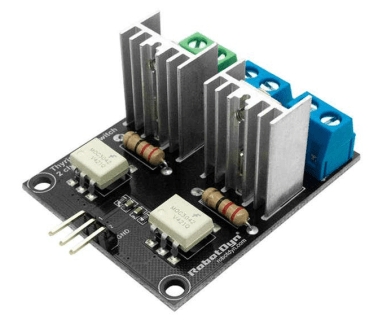
The 2-channel AC triac switch is an electronic device that allows controlling the flow of current in an AC (alternating current) circuit. Using a low-voltage control signal (3.3V or 5V), it can turn on or off the current flow in an AC circuit with a maximum of 5 Amps.
Features
- 2 control channels
- Control logic: 3.3V / 5V
- Maximum current: 5A
- Control voltage: AC/DC
What it is for
This switch is ideal for controlling electrical devices in applications with Arduino or other microcontrollers. It can be used to create home control systems, lighting systems, electric motors, and much more. It allows protecting circuits from overcurrent and electrical faults.
Tutorial: How to use 2-channel AC triac switch
This AC solid-state relay switch is ideal for protecting your circuits from overcurrent and electrical faults. Suitable for Arduino projects and home control systems.
What you need
- AC solid-state relay switch 2 channels
- Arduino or compatible microcontroller
- Connection cables
- Resistor (if necessary)
Steps
- 1. Check that the switch is compatible with your microcontroller’s logic (3.3 V or 5 V).
- 2. Connect the VCC of the switch to the VCC of the microcontroller.
- 3. Connect GND of the switch to GND of the microcontroller.
- 4. Connect the switch channels to the correct pins of the microcontroller (check the datasheet).
- 5. Connect the load lines to the device to be protected.
- 6. Add a resistor if necessary between the microcontroller pin and the switch.
- 7. Upload the code to Arduino.
- 8. Test the system to ensure it works correctly.
Mini project
Create an electrical device protection system using the AC solid-state relay switch. In 30 minutes you can have a working prototype.
Common mistakes
- Do not connect the switch directly to the microcontroller without a resistor.
- Using the wrong pin of the microcontroller.
- Omitting the check on the datasheet.
- Forgetting to connect GND correctly.
Recommended accessories
- Arduino microcontroller
- Resistor
- Device to protect
Frequently asked questions
Can I use this switch with a 3.3 V microcontroller?
Yes, but check the datasheet to see if it is compatible with 3.3 V logic.
How much current can the switch handle?
It can handle up to 5 A, but check the device you are protecting.
Do I always need to connect GND?
Yes, it is necessary for the proper functioning of the switch.
Can I use this switch to protect multiple devices?
Yes, but connect each device separately.



Reviews
There are no reviews yet.