 EN
 IT Italiano
 ES Español
 FR Français
 DE Deutsch
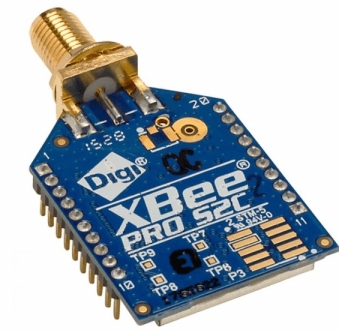
Description
What it is
The XBee Pro S2C is a wireless communication module for Arduino and other electronic devices. It allows for bidirectional data transmission over long distances.
Features
- Type: Wireless Communication Module
- Protocol: check the datasheet
- Connection: check the datasheet
- Operating Voltage: check the datasheet
- SKU: ARD0011839
- Price: 65.04 €
What it is for
The XBee Pro S2C is ideal for electronic projects that require long-range connectivity between devices. It can be used to connect sensors to an Arduino, create remote monitoring systems, or wirelessly transmit data between devices.
Tutorial: How to Use XBee Pro S2C
The XBee Pro S2C is a wireless communication module ideal for electronic projects requiring long-range connectivity. It is particularly suitable for beginner and intermediate makers who want to transmit data between Arduino devices without physical connections.
What you need
- Arduino Uno
- External antenna
- USB connection
- Software XCTU
- Batteries
Steps
- Install the XCTU software to configure the XBee Pro S2C module.
- Configure the XBee Pro S2C module via XCTU with the desired settings (check the datasheet).
- Connect the XBee Pro S2C module to the Arduino Uno using a serial adapter.
- Download and install the XBee library for Arduino.
- Write an Arduino sketch that communicates with the XBee Pro S2C module.
- Verify that data is transmitted correctly between two Arduino devices connected via the XBee Pro S2C modules.
- If necessary, add an external antenna to increase the range of the transmission.
- Test the stability of the connection in various environmental conditions.
Example code
Xbee xbee;
void setup() {
  Serial.begin(9600);
  xbee.begin(Serial);
}
void loop() {
  xbee.sendData("test");
}
Mini project
Create a remote monitoring system for temperature and humidity sensors. Connect the sensors to an Arduino with an XBee Pro S2C module and transmit the data to a second Arduino with another XBee Pro S2C module.
Common mistakes
- Set the transmission speed incorrectly.
- Fail to configure the XBee Pro S2C module correctly with XCTU.
- Fail to connect the XBee Pro S2C module to the Arduino correctly.
- Fail to add an external antenna to increase the range of the transmission.
Recommended accessories
- External XBee Antenna
- XBee Serial Connection
- Arduino Batteries
- Temperature and Humidity Sensors
Frequently asked questions
How can I configure the XBee Pro S2C module?
Use the XCTU software to configure the XBee Pro S2C module according to your needs.
What are the advantages of using an external antenna with XBee Pro S2C?
An external antenna increases the transmission range and improves connection stability.


Reviews
There are no reviews yet.