 EN
 IT Italiano
 ES Español
 FR Français
 DE Deutsch
Description
What it is
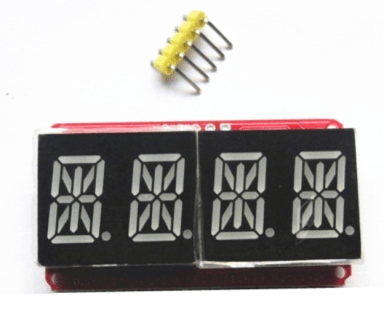
The 4-digit multi-color red-orange digital segment module is an electronic component designed for displaying numbers and letters in electronic applications. This module uses the HT16K33 chip for I2C control, making it easy to integrate with microcontrollers like Arduino.
Features
- 4-digit multi-color digital segment module
- Red-orange color
- I2C control via HT16K33 chip
- Allows for the display of numbers and letters
What it is for
This module is ideal for projects that require a clear and easy-to-integrate digital display. It can be used as a counter or signal in various electronic devices. It is particularly useful for beginners and intermediate makers developing projects with Arduino or ESP.
Tutorial: How to use Double-color red-orange 4-digit digital segment module
This 4-digit segment LED module is ideal for displaying numbers and letters in projects that require a digital display. Useful for beginners and intermediate makers.
What you need
- Arduino or compatible microcontroller
- Dual cable for I2C
- 220Ω resistor (for each LED segment pin)
- Adafruit HT16K33 library (for Arduino)
Steps
- 1. Connect the HT16K33 module to your Arduino using the dual I2C cable (SDA and SCL).
- 2. Connect the VCC and GND pins of the module to the VCC and GND of your Arduino.
- 3. Connect a 220Ω resistor to each LED segment pin (if not already present on the module).
- 4. Check the datasheet to see if the module supports red and orange colors.
- 5. Install the Adafruit HT16K33 library in your Arduino IDE.
- 6. Write the code to initialize the module and display a number (example: `HT16K33.display(1234);`).
- 7. Upload the code to your Arduino.
- 8. Verify that the display correctly shows the numbers.
Example code
```cpp
#include <Adafruit_HT16K33.h>

Adafruit_HT16K33 display = Adafruit_HT16K33(0x70);

void setup() {
  display.begin();
}

void loop() {
  display.clear();
  display.display(1234);
  delay(1000);
}
```
Mini project
Create a simple digital timer that counts from 0000 to 9999 with an increment of 1 every second.
Common mistakes
- Do not check if the module supports red and orange colors.
- Forget to connect the I2C pins correctly.
- Do not install the Adafruit HT16K33 library.
- Write incorrect code to initialize the module.
Recommended accessories
- I2C HT16K33 Controlled LED Nixie Tube Display
- Arduino Uno or compatible
- Dual cable for I2C
- 220Ω resistor
Frequently asked questions
Does the module support red and orange colors?
Check the datasheet.
Which pins to use for the colors?
Check the datasheet for specific color pins.
Can I use another microcontroller?
Yes, but it may require a different library.
Reviews
There are no reviews yet.