 EN
 IT Italiano
 ES Español
 FR Français
 DE Deutsch
Description
What it is
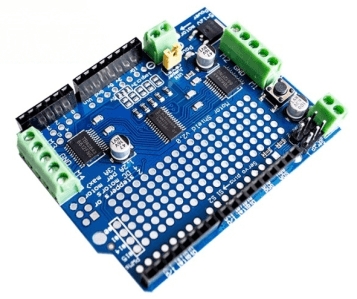
The Motor / Stepper / Servo Shield v2 is a module for Arduino that simplifies the control of stepper motors and DC motors.
Features
- Compatible with Arduino
- Control of stepper motors and DC motors
- SKU: ARD0011910
- Price: 11.32 €
What it is for
The stepper motor control module v2 is ideal for robotics projects, 3d printers, and any application that requires precise motor control. It can be used to create opening and closing systems, object movement, precision control, and more.
Tutorial: How to use Stepper Motor Control Module v2
The stepper motor control module v2 is an essential component for controlling stepper motors and servomotors with Arduino. Ideal for robotics projects, 3d printers, and any application that requires precise motor control.
What you need
- Arduino uno or compatible
- Stepper motor or servomotor
- USB cable to connect Arduino to the computer
- Arduino IDE software installed
Steps
- Connect the module to the Arduino power supply port
- Check the connector compatibility of the module with your stepper motor or servomotor
- Connect the stepper motor or servomotor to the module
- Connect the module to the Arduino microcontroller
- Open the Arduino IDE software and load the example sketch for stepper motor control
- Check the datasheet to set the speed and direction of the stepper motor
- Load the example sketch for servomotor control
- Check the datasheet to set the position of the servomotor
Example code
void setup() {
  pinMode(2, OUTPUT);
}

void loop() {
  digitalWrite(2, HIGH);
  delay(1000);
  digitalWrite(2, LOW);
  delay(1000);
}
Mini project
Create an automatic drawer opening and closing system using a servomotor and the servo motor control module v2. Connect the servomotor to the module and the Arduino microcontroller, then write a sketch to control the drawer opening and closing.
Common mistakes
- Do not check the connector compatibility before connecting
- Do not load the correct sketch for the motor type
- Do not check the module power supply voltage
- Do not check the module compatibility with the microcontroller
Recommended accessories
- NEMA 17 stepper motor
- SG90 servo motor
- 3.7V LiPo battery
- USB A-Micro power supply cable
Frequently asked questions
Does the module support both servo motors and stepper motors?
Yes, the module supports both types of motors.
What is the recommended power supply voltage?
Check the datasheet for the recommended power supply voltage.
How can I control multiple motors?
You can control multiple motors by connecting multiple modules or using a multiplexer.
Reviews
There are no reviews yet.