 EN
 IT Italiano
 ES Español
 FR Français
 DE Deutsch
Description
What it is
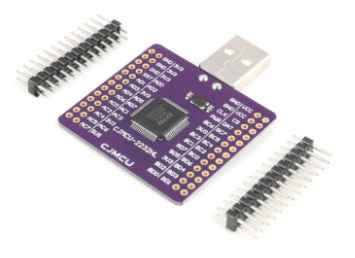
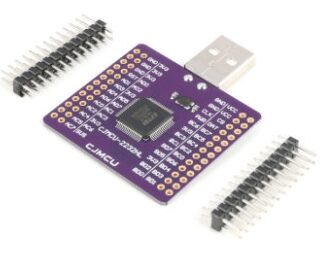
The MCU-2232 FT2232HL is a versatile USB module that expands the functionality of an Arduino or other microcontrollers, offering support for various communication interfaces.
Features
- Support UART, SPI, I2C and JTAG
- USB Connection
- Integrates a FIFO circuit
- Compatibility with RS232
What it is for
The FT2232HL module is useful for advanced electronics projects that require flexible communication with electronic devices. It can be used to remotely monitor electronic devices, communicate with microcontrollers, develop electronic software, and much more.
Tutorial: How to use FT2232HL Module
The FT2232HL module is a USB to UART/FIFO/SPI/I2C/JTAG/RS232 bridge ideal for developers and makers who need a robust interface to communicate with electronic devices. This component is particularly useful for those working with microcontrollers and for those involved in electronic software development.
What you need
- Arduino or computer with USB port
- USB cable
- VCP (Virtual COM Port) library for Arduino
- Development software such as Arduino IDE
Steps
- Connect the FT2232HL module to the computer via USB cable
- Install the VCP library for Arduino
- Configure the USB port in Arduino IDE
- Write an Arduino sketch to test the communication
- Verify the communication with the serial monitor in Arduino IDE
- Try to configure the module for SPI/I2C/JTAG through the development software
- Check the module specifications on the datasheet for further configurations
- Share your test results with the Arduiner community
Example code
void setup() {
  Serial.begin(9600);
}

void loop() {
  Serial.println("Hello World!");
}
Mini project
Create a remote monitoring system for an electronic device using the FT2232HL module for communication. The project should take about 30 minutes to configure and test.
Common mistakes
- Do not install the VCP library correctly
- Configure the wrong USB port in the Arduino IDE
- Do not verify communication through the serial monitor
- Do not consult the datasheet for the module specifications
Recommended accessories
- USB A-MicroB cable
- Arduino Uno
- Arduino Integrated Development Environment (IDE) software
- VCP library for Arduino
Frequently asked questions
How can I install the VCP library for Arduino?
Download the VCP library from the official FTDI website and install it in the Arduino IDE library manager.
Which protocols does the FT2232HL module support?
The FT2232HL module supports UART, FIFO, SPI, I2C, JTAG, and RS232.
Where can I find the datasheet for the FT2232HL module?
The datasheet for the FT2232HL module is available on the official FTDI website.
Reviews
There are no reviews yet.