 EN
 IT Italiano
 ES Español
 FR Français
 DE Deutsch
Description
What it is
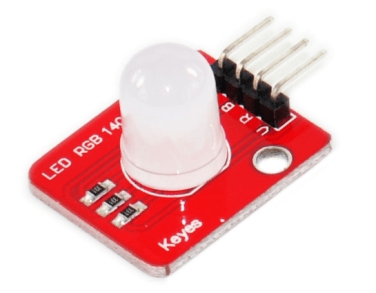
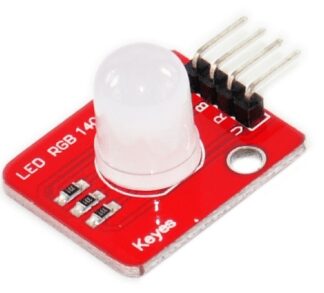
The RGB LED Module 10mm F10 is an electronic component designed to add RGB lighting functionality to Arduino and other electronic programming projects.
Features
- RGB Tricolor LED Module
- LED Size: 10mm
- Type: F10
What it is for
The RGB LED Module 10mm F10 is ideal for projects requiring controllable RGB lighting. You can use it to create dynamic and interactive lighting effects, for example by connecting it to a light sensor to change the color based on ambient light levels. It is compatible with Arduino and other microcontrollers.
Tutorial: How to Use RGB LED Module 10mm
The RGB LED Module 10mm is a versatile component for RGB lighting projects. This module is ideal for beginners and makers who want to add a touch of dynamic color to their projects.
What you need
- Arduino Uno
- Jumper Wire
- Breadboard
- Current Limiting Resistors
- Arduino IDE Software
Steps
- Connect the pins of the RGB LED module to the breadboard.
- Connect jumper wires between the pins of the RGB LED module and the Arduino.
- Check the correct connection of the pins (GND, VCC, Data).
- Open Arduino IDE and upload a sample sketch.
- Modify the sketch to customize the color and behavior of the RGB LED.
- Verify that the RGB LED changes color based on the uploaded sketch.
- Test the functionality by adding a light sensor to control the RGB LED.
- End of tutorial, the RGB LED now changes color based on the commands from the Arduino.
Example code
void setup() {
  pinMode(9, OUTPUT);
}

void loop() {
  analogWrite(9, 128); // cambia il colore del LED RGB
}
Mini project
Create an RGB light bulb controllable with a light sensor. Connect a light sensor to the RGB LED module and make the color change based on ambient light.
Common mistakes
- Connect the VCC pin to the GND.
- Use too low resistances.
- Do not upload the correct sketch.
- Do not check the datasheet for the correct current values.
Recommended accessories
- Current limiting resistors
- Light Dependent Resistor (LDR) Sensor
- LCD Module
- Arduino Battery
Frequently asked questions
The RGB LED does not light up.
Check the connection and pin connections, make sure the current values are correct.
How to change the color of the RGB LED?
Modify the output values on the data pins in the Arduino code.
Reviews
There are no reviews yet.