 EN
 IT Italiano
 ES Español
 FR Français
 DE Deutsch
Description
What it is
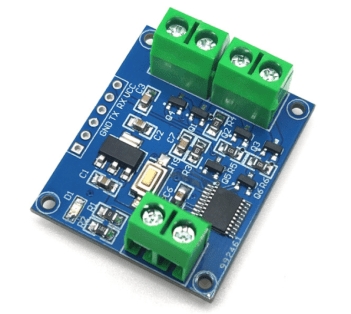
The RGB LED Light Color / Dimmer Control Board PWM / Programmable is an electronic circuit that allows controlling the color and brightness of RGB LEDs. It can be used to create customized and dynamic lighting effects.
Features
- PWM Control for color and brightness adjustment
- Compatible with RGB LEDs
- SKU: ARD0011841
- Price: 6.33 €
What it is for
This board is ideal for custom lighting projects, drones, consumer electronics, and interactive visual arts. For example, you can create an interactive RGB chandelier that changes color in response to ambient sounds. Compatibility with Arduino and ESP should be verified in the datasheet.
Tutorial: How to use RGB LED Light Color / Dimmer
The RGB PWM control board allows you to adjust the color and intensity of one or more RGB lights. Ideal for custom lighting projects, drones, consumer electronics, and interactive visual arts.
What you need
- Arduino Uno or compatible
- USB cable
- Jumper connections
- RGB LEDs
- Power supply
Steps
- Connect the RGB PWM board to the Arduino using jumper wires.
- Connect the RGB LEDs to the PWM pins on the RGB PWM board.
- Connect the RGB PWM board to the power supply.
- Download and upload the provided Arduino sketch.
- Set the desired colors and intensity in the code.
- Check that the RGB LEDs respond correctly.
- Modify the code to create custom lighting effects.
- Test the project in various usage scenarios.
Example code
void setup() {
  pinMode(9, OUTPUT);
  pinMode(10, OUTPUT);
  pinMode(11, OUTPUT);
}

void loop() {
  analogWrite(9, 128);
  analogWrite(10, 64);
  analogWrite(11, 255);
}
Mini project
Create an interactive RGB chandelier that changes color in response to ambient sounds.
Common mistakes
- Do not verify the proper power supply of the circuit.
- Omit the current limiting resistor for the RGB LED.
- Do not test the code before implementing it in the final project.
- Use an RGB LED incompatible with the PWM board.
Recommended accessories
- Arduino Uno
- 5V Power Supply
- RGB LED
- Resistors
Frequently asked questions
How to adjust the color of the LEDs?
Modify the analogWrite values for each RGB pin in the Arduino code.
Which RGB LEDs are compatible?
Check the datasheet of the RGB PWM board for compatibility.
Can it be used with other microcontrollers?
Yes, but it may be necessary to modify the code to adapt it to the specific pins of the microcontroller.

Reviews
There are no reviews yet.