 EN
 IT Italiano
 ES Español
 FR Français
 DE Deutsch
Description
What it is
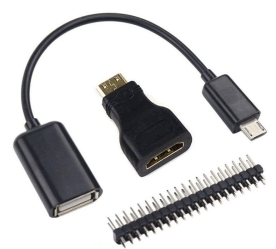
The Raspberry Pi Zero 3 in 1 Kit is a set of essential components to get started with the small Raspberry Pi Zero computer. This kit includes a USB-MicroUSB cable, a male header, and an HDMI adapter.
Features
- USB-MicroUSB cable
- Male header
- HDMI adapter
What it is for
The kit components are ideal for beginners and makers who want to explore the features of the Raspberry Pi Zero. The USB-MicroUSB cable allows you to power the device, the male header provides access to the GPIO pins while the HDMI adapter enables connection to a monitor or TV to display the graphical interface.
Tutorial: How to use Raspberry Pi Zero 3 in 1 Kit
The Raspberry Pi Zero 3 in 1 Kit includes everything you need to get started with this small computer. Ideal for beginners and makers who want to explore the capabilities of the Raspberry Pi Zero.
What you need
- Raspberry Pi Zero
- HDMI display connection
- USB Power Supply
Steps
- Connect the MicroUSB cable to the power supply and the Raspberry Pi Zero.
- Install the male header on the Raspberry Pi Zero using the support pins or a soldering iron.
- Connect the HDMI adapter to the Raspberry Pi Zero and then to the display.
- Check that the Raspberry Pi Zero is properly powered and functioning.
Mini project
Create a simple graphical interface with Python to control an LED connected to one of the GPIO pins of the Raspberry Pi Zero.
Common mistakes
- Ensure that the male header is well soldered.
- Verify the compatibility of the HDMI adapter dimensions with your display.
- Check the proper connection of all components.
Recommended accessories
- RGB LED
- 330 Ohm Resistor
- Ethernet Cable
- Raspberry Pi Zero Starter Kit
Frequently asked questions
The kit contains only USB cable and header, I do not find the HDMI adapter.
Check that the product is complete. The HDMI adapter is included in the kit.
How can I connect a mouse and a keyboard?
Use the USB ports of the Raspberry Pi Zero to connect wireless or Bluetooth devices.
Reviews
There are no reviews yet.