 EN
 IT Italiano
 ES Español
 FR Français
 DE Deutsch



Description
What it is
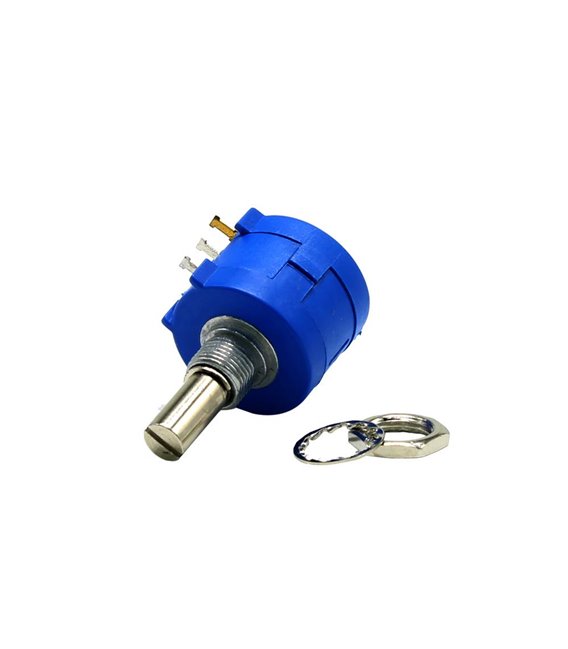
The axial multi-turn precision potentiometer 5kOhm is an electronic component used to adjust analog variables in Arduino, DIY, and maker projects. This type of potentiometer offers greater accuracy compared to standard models.
Features
- Type: Axial Multi-Turn Potentiometer
- Total Resistance: 5kOhm
- Product Code: 3590S-2-502L
What it is for
This potentiometer is ideal for projects requiring precise adjustment of variables such as audio volume or light intensity. It is compatible with Arduino and other microcontrollers.
Tutorial: How to Use Axial Potentiometer 5k 3590S-2-502L
The axial potentiometer 5k 3590S-2-502L is ideal for controlling analog variables such as volume or light intensity. Perfect for beginner and intermediate maker projects.
What you need
- Potentiometer 3590S-2-502L
- Arduino UNO
- 5V Power Cable
- 10kΩ Resistor
- Multimeter
Steps
- 1. Assemble the potentiometer on a test circuit.
- 2. Connect the GND pin of the potentiometer to the GND of the Arduino.
- 3. Connect the V+ pin of the potentiometer to the 5V of the Arduino.
- 4. Connect the center pin of the potentiometer to a digital pin of the Arduino (e.g., A0).
- 5. Connect one end of the 10kΩ resistor between A0 and GND.
- 6. Connect the other end of the 10kΩ resistor to V+.
- 7. Load the provided Arduino code.
- 8. Verify the analog reading with a multimeter.
Example code
int val = analogRead(A0); Serial.println(val);Mini project
Create a volume control for a speaker using a potentiometer.
Common mistakes
- Do not connect the potentiometer directly to GND without a resistor.
- Check that the potentiometer is properly connected.
- Ensure that the Arduino code is correct.
- Verify that the power supply is stable.
Recommended accessories
- Altoparlante
- Speaker
- Arduino UNO
- 10kΩ Resistor
Frequently asked questions
Does the potentiometer work with all versions of Arduino?
Yes, it works with Arduino UNO and compatible boards.
Can I use a different potentiometer?
Yes, but check the resistance and connector.
Does the potentiometer need external power?
No, it is powered through V+ and GND.
Why is a resistor necessary?
It is needed to form a pull-up circuit and stabilize the analog reading.



Reviews
There are no reviews yet.