 EN
 IT Italiano
 ES Español
 FR Français
 DE Deutsch
Description
What it is
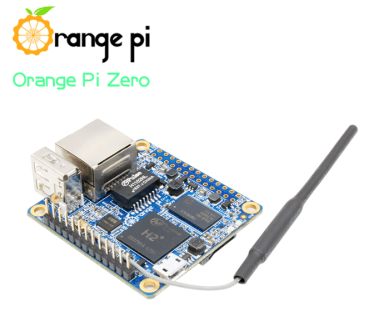
The Orange PI Zero512 H2 512MB is a small computer based on an ARM microprocessor, ideal for various electronic projects. With a lightweight and flexible configuration, it is suitable for developing artificial intelligence, robotics, and IoT systems applications.
Features
- ARM Microprocessor
- 512MB of RAM
- Suitable for 3D printing, robotics, and IoT systems projects
- Great for building drones
What it is for
This device is used to create climate monitoring IoT systems, integrating temperature and humidity sensors and network modules. Additionally, it is compatible with projects requiring a small computer with advanced processing capabilities.
Tutorial: How to use Orange PI Zero512 H2 512MB
The Orange PI Zero512 H2 is a small computer based on ARM with 512MB of RAM, ideal for 3D printing, robotics, and IoT systems projects. This tutorial will guide you through the initial steps to configure and use it.
What you need
- Orange PI Zero512 H2 512MB
- MicroSD Card
- USB OTG Cable
- Ethernet Network Adapter (optional)
- USB Power Supply
Steps
- Connect the Orange PI Zero512 H2 to the USB power supply.
- Insert the MicroSD card into the MicroSD slot of the Orange PI.
- Connect the USB OTG cable to a computer and to the Orange PI for file transfer.
- Verify Ethernet connectivity (optional).
- Configure the operating system via installation software on a computer.
- Start the Orange PI Zero512 H2 and log in to the system.
- Install any system updates.
- Configure the system for headless mode (without monitor) usage.
Mini project
Create an IoT weather monitoring system with Orange PI Zero512 H2 512MB, a temperature and humidity sensor, and a network module.
Common mistakes
- Ensure the MicroSD card is formatted correctly.
- Verify the correct connection of the USB OTG cable.
- Configure the system correctly for remote access.
- Install the correct operating system for the desired features.
Recommended accessories
- MicroSD Card Reader
- Ethernet Cable
- Temperature and Humidity Sensor DHT22
- Wi-Fi Module
Frequently asked questions
What is the CPU speed of the Orange PI Zero521 H2?
Check the datasheet.
How can I access the system without a monitor?
Configure SSH and VNC for remote access.
How much memory is available?
Check the datasheet.

Reviews
There are no reviews yet.