 EN
 IT Italiano
 ES Español
 FR Français
 DE Deutsch
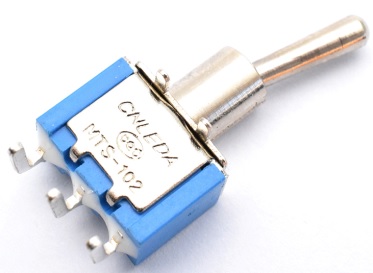
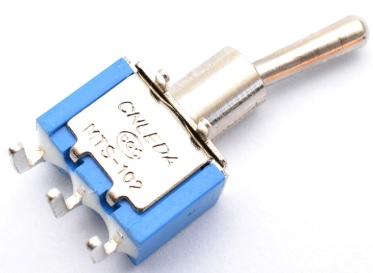
Description
What it is
The MTS-102C3 3Pins 2Positions is a toggle switch designed for use in electronic projects, such as those based on Arduino.
Features
- 3 pin
- 2 positions
- Operating voltage: 250V
- Operating current: 3A
What it is for
The MTS-102C3 toggle switch is ideal for controlling the activation and deactivation of circuits in electronic devices. For example, it can be used to turn on or off an LED, control a motor, or manage other functions. It is suitable for both beginner and experienced makers.
Tutorial: How to use MTS-102C3
The MTS-102C3 toggle switch is ideal for controlling features on electronic devices. Useful for beginner and intermediate makers.
What you need
- Toggle Lever MTS-102C3
- Arduino
- Pull-up resistor
- Connection wire
Steps
- 1. Ensure your Arduino is powered and connected to the computer.
- 2. Connect the lever to pin 2 of Arduino using a connection wire.
- 3. Connect a pull-up resistor between pin 2 and GND.
- 4. Upload the following code to Arduino.
- 5. Check the position of the lever to verify if the code works correctly.
- 6. Disconnect and reset.
- 7. Try moving the lever and observe the changes on the Arduino screen.
- 8. Check the datasheet for further details.
Example code
int levettina = 2;
void setup() {
  pinMode(levettina, INPUT);
}
void loop() {
  int posizione = digitalRead(levettina);
  if (posizione == HIGH) {
    Serial.println("Posizione alta");
  } else {
    Serial.println("Posizione bassa");
  }
}
Mini project
Create a simple switch to turn on/off an LED.
Common mistakes
- Do not verify the correct connection before uploading the code.
- Omit connecting a pull-up resistor.
- Connect the lever to an analog pin instead of a digital pin.
- Forget to check the position of the lever after connection.
Recommended accessories
- LED and resistor
- LCD display
- Arduino UNO
Frequently asked questions
Can I use a different lever switch?
Yes, but verify the compatibility of the specifications.
Which Arduino pins can I use?
You can use any digital pin.
Is a pull-up resistor necessary?
No, but it is recommended for proper reading.
What should I do if the code doesn’t work?
Check the connection and the code. Check the datasheet.



Reviews
There are no reviews yet.