 EN
 IT Italiano
 ES Español
 FR Français
 DE Deutsch
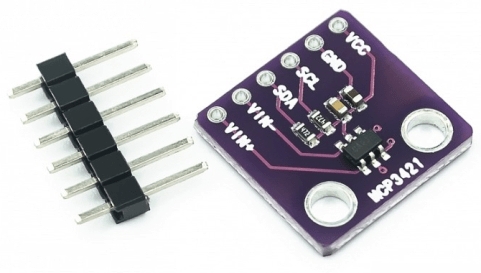
Description
What it is
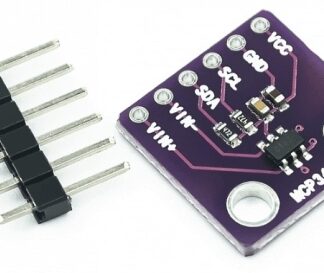
The MCP3421 I2C Evaluation Board is a device designed for evaluating and testing the MCP3421 analog-to-digital converter sensor. This board simplifies the understanding and implementation of the MCP3421 sensor in Arduino projects.
Features
- Based on the MCP3421 sensor
- I2C Interface
- For sensor evaluation and testing
What it is for
The board is ideal for projects requiring precise electrical readings, such as sound monitoring with a microphone. It can be connected to Arduino or other I2C compatible microcontrollers. Check the datasheet for detailed technical specifications.
Tutorial: How to use the MCP3421 I2C Evaluation Board
The MCP3421 I2C Evaluation Board is perfect for testing and understanding the operation of the MCP3421 analog-to-digital converter sensor. Useful for beginner and intermediate makers.
What you need
- Arduino or compatible
- I2C cable
- 10kΩ pull-up resistor
- Test sensors (e.g., a thermometer or a microphone)
Steps
- 1. Connect the board to your Arduino via the I2C pins (SDA and SCL).
- 2. Connect the pull-up resistor between SDA and VCC.
- 3. Connect the test sensor to channel A0 of the board.
- 4. Load the example code onto Arduino.
- 5. Check the datasheet for channel and conversion configuration.
- 6. Run the code and verify the results.
- 7. Try with different sensors.
- 8. Configure the sampling rate and data format.
Example code
```
#include <Wire.h>
#include <Adafruit_MCP3421.h>

Adafruit_MCP3421 mcp = Adafruit_MCP3421();

void setup() {
  Serial.begin(9600);
}

void loop() {
  int16_t result = mcp.read(0, MCP3421_CHANNEL_1);
  Serial.println(result);
  delay(1000);
}
```
Mini project
Create a sound monitoring system using a microphone and the MCP3421 I2C Evaluation Board. Connect the microphone to channel A1 and read the volume values.
Common mistakes
- Do not check the channel configuration before starting.
- Forget to connect the pull-up resistor.
- Use an unsupported sensor.
- Do not configure the sampling rate correctly.
Recommended accessories
- Microphone for sound test
- Temperature test thermometer
- Long I2C cable
- 10kΩ resistor
Frequently asked questions
Does the MCP3421 I2C Evaluation Board support only temperature sensors?
No, it supports various types of analog sensors, such as microphones and thermometers.
Can I use any sensor with this board?
Check the datasheet to see if the sensor is supported.
What is the difference between the different channels?
The channels differ in precision and sampling rate, check the datasheet.
Reviews
There are no reviews yet.