 EN
 IT Italiano
 ES Español
 FR Français
 DE Deutsch

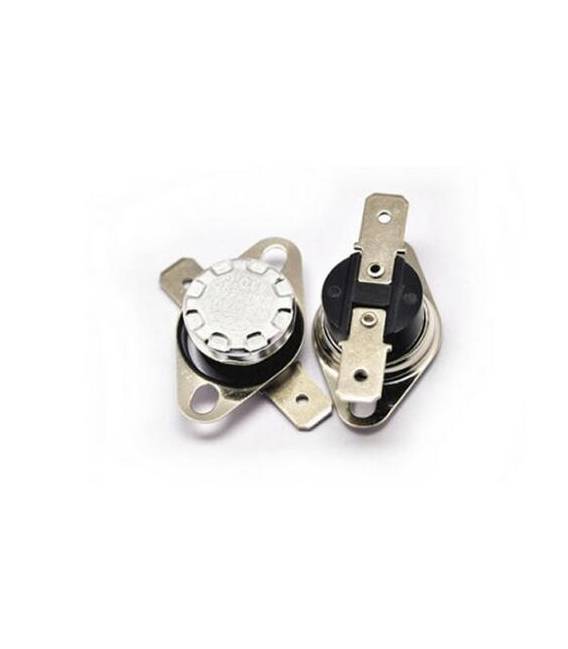
Description
What it is
The KSD301 is a thermal relay designed to protect your circuits from thermal overloads.
Features
- Operating voltage: 250V
- Operating current: 10A
- Activation temperature: 80 degrees
What it is for
The KSD301 is useful for protecting DC motors, 3D printers, and other electronic components from excessive temperatures. It can be integrated into circuits to interrupt the current flow when the temperature exceeds a predefined limit, preventing damage and malfunctions.
Tutorial: How to use KSD301
The KSD301 is a thermal relay ideal for protecting your circuits from electrical overloads. It is useful for beginners and intermediates working with electrical circuits.
What you need
- KSD301
- Arduino or microcontroller
- Thermal resistance
- Head connector
Steps
- 1. Check the specifications on the datasheet: 250V, 10A, 80 degrees.
- 2. Assemble the thermal resistance to the relay.
- 3. Connect the relay to the microcontroller: VCC to 5V, GND to GND, COM to a relay.
- 4. Connect the relay to your device: NO to a component.
- 5. Load the code: `digitalWrite(2, HIGH);` to turn on, `LOW` to turn off.
- 6. Check the operation with a multimeter.
- 7. Install an emergency protection software.
- 8. Test the relay under various thermal conditions.
Example code
```
digitalWrite(2, HIGH);
```
Mini project
Create a protection circuit for a DC motor with the KSD301.
Common mistakes
- Do not verify the specifications on the datasheet.
- Connect the relay to voltages above 250V.
- Omit the emergency protection.
- Do not test the relay under various thermal conditions.
Recommended accessories
- Thermal resistance
- Header connector
- Multimeter
- DC motor
Frequently asked questions
How can I verify the operation of the relay?
Use a multimeter to check the current and voltage.
What are the voltage limits for this relay?
The relay supports up to 250V.
Can I use this relay for AC circuits?
Check the datasheet: it may not be designed for AC circuits.

Reviews
There are no reviews yet.